Map size changes Rust server performance mostly through entity count, not raw distance. A bigger world size means more trees, rocks, monuments, and roads for your server to track every tick, and that’s what drains CPU, RAM, and save-file speed, not the extra meters players walk. This guide breaks down exactly how map size affects Rust server performance, what to check first, and how to size your map correctly for your player count.
You’ll learn how the worldsize convar actually works, why entity count scales faster than the size number suggests, and where CPU, RAM, and network each take the hit. We’ll walk through checking your current performance, resizing your map safely, and tuning a big map so it doesn’t choke your server. By the end, you’ll know exactly which lever to pull when a large map starts costing you FPS.
Want to run this on your own server? Physgun’s Rust server hosting runs on overclocked Ryzen 9 9950X CPUs built for Rust’s single-core-heavy tick loop, so a bigger map actually has room to run well.
What Map Size Actually Means In Rust
Rust generates its map procedurally from two numbers, worldsize and seed. Worldsize sets the map’s diameter in meters, and the seed decides where everything lands inside that space: monuments, roads, rivers, and resource nodes.
Most community servers run somewhere between 3,000 and 4,500. Official-style servers often push higher, into the 4,500 to 6,000 range. The number isn’t all usable land either; a chunk of any worldsize is ocean border, so a 4,500 map doesn’t hand you 50% more buildable land than a 3,000 map.
That’s the part that trips people up. World size is a diameter, but land area scales with the square of that diameter. Going from 3,000 to 4,500 isn’t a 50% jump in map content. It’s closer to a 2.25x increase.
How Map Size Drives Entity Count (The Real Performance Cost)
Rust’s procedural generator keeps resource density roughly constant per square meter. Trees, ore nodes, junkpiles, roads, and monuments all spawn at a similar rate regardless of world size. So when land area doubles, entity count roughly doubles with it.
Entity count is what your server actually pays for, not the size number by itself. Every tree that can be chopped, every node that respawns, every animal pathing around the map is an entity your server’s tick loop has to think about, update, and network to nearby players.
This is why two servers running the same worldsize can perform very differently a few weeks into a wipe. Player-built entities (walls, furnaces, storage, turrets) stack on top of the procedural count, and abandoned bases pile up fast on a big map where players have room to spread out.
Custom, hand-built maps aren’t locked into this scaling. A 4,000-size custom map can carry fewer or more objects than a similarly-sized procedural one, since a map maker places things by hand instead of letting the generator fill every square meter.
Checking Your Server’s Current Performance
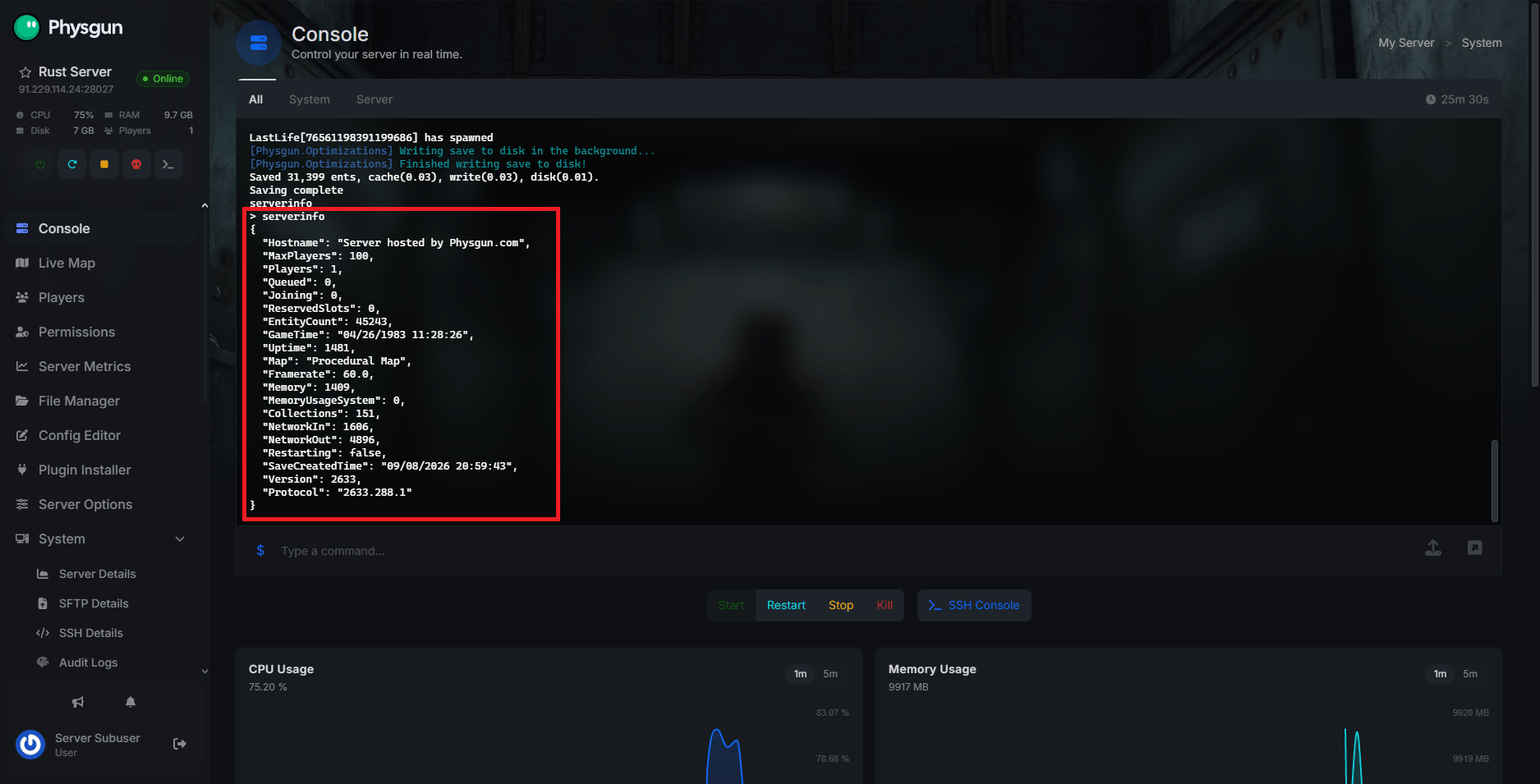
Before you touch worldsize, find out whether entity count is actually your bottleneck. Rust reports server FPS (its tick throughput, not a rendering framerate) and memory usage through the serverinfo console command.
Checking Performance Through The Server Metrics Tab
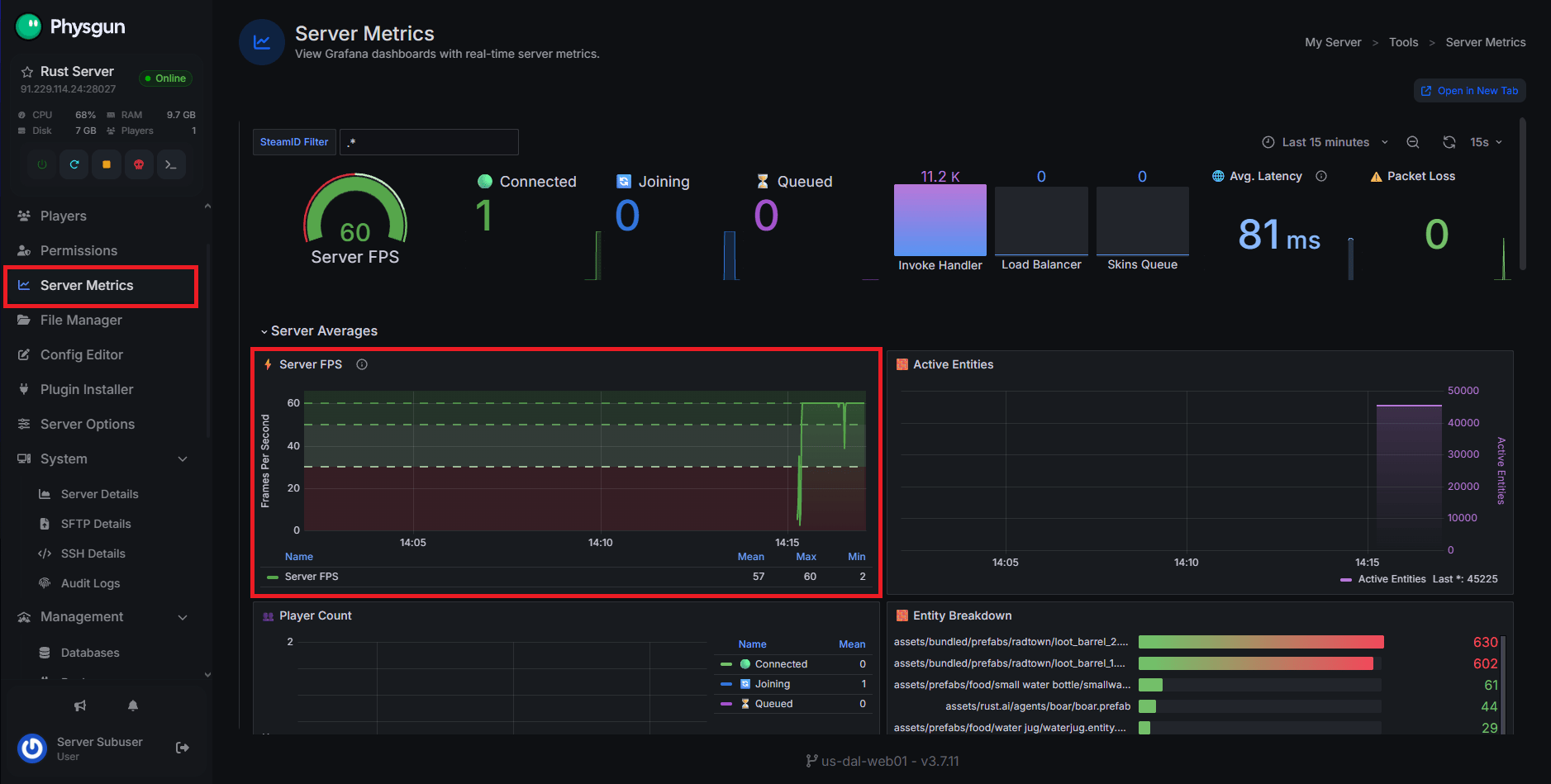
Physgun’s Server Metrics panel graphs this for you in real time, so you don’t need to type a command or parse console output. To check it:
- Head to the Physgun Gamepanel and open your Rust server.
- On the left side of the screen, select Server Metrics.
- Watch the live FPS, CPU, and memory graphs while players are online.
- Scroll to the per-plugin breakdown to see hook and invoke time in milliseconds for each installed plugin.
That last part matters more than most admins realize. A plugin quietly taking 4-5ms on every hook call is often a bigger drag on a large map than the map size itself, since more entities means that plugin’s hooks fire more often.
Checking Performance Manually
To check performance manually:
- Visit your server console.
- Run
serverinfo. - Read the Framerate line for server FPS and the Memory line for how much RAM the process is using.
- Repeat this at different times of day, since entity count and FPS both drift as players build and the wipe cycle ages.
Server FPS under roughly 30 starts to feel like input delay to players: doors opening late, harvesting stutter, that kind of thing. Well under 15 is when a server starts to feel broken.
CPU: Why Big Maps Hit One Core The Hardest
Rust’s server tick loop leans heavily on one core. A lot of the entity thinking, physics, and AI pathing that has to happen every tick runs through a single primary thread, so adding CPU cores past a certain point doesn’t help a laggy Rust server the way it would help a database or a web app.
Clock speed is what actually helps, since it’s how fast that one thread gets through its per-tick workload. Two hosts advertising the same CPU model can still perform differently on a big map if one hasn’t tuned for Rust’s specific threading behavior.
This is exactly what Physgun’s Rust server hosting is built around: overclocked Ryzen 9 9950X CPUs with Rust Engine Optimizations tuned specifically for this single-core bottleneck, not just a raw core count on a spec sheet.
A bigger map means more entities for that one thread to get through every tick. That’s the direct line from world size to server FPS: more land area, more entities, more per-tick work, lower FPS, if nothing else about the server changes.
RAM, Save Files, And Restart Times On Large Maps
Every entity your server tracks lives in memory. A larger map with more procedural objects and more player-built structures needs more RAM just to hold that entity list, on top of what Rust needs for its own baseline processes.
The map save file grows with world size too. A 3,000 map’s save might be a fraction the size of a 4,500 map’s after a few weeks of building. That bigger save file takes longer to write during autosaves and longer to load when the server restarts or wipes.
Disk speed matters more here than people expect. NVMe Storage loads a large map and syncs Workshop content noticeably faster than the SATA drives some budget hosts still run, which shows up directly as shorter restart and wipe downtime. DDR5 Memory helps too, since it’s lower latency than the DDR4 still common on cheaper hosts, and that latency affects how quickly the server can read and write entity state, not just how much it can hold.
If you’re not sure how much RAM your planned map size actually needs, run it through the Rust Server RAM Calculator before you commit to a plan. It’s modeled on real running servers, not padded numbers, with roughly 6-8GB fitting a small vanilla server and 16GB or more for a large modded one.
Network And Bandwidth: Why A Big Map Doesn’t Lag Every Player Equally
This is where map size performance gets misunderstood. Rust only networks entities that are near a given player, so a bigger map doesn’t multiply the bandwidth each individual player needs. Someone building alone in a corner of a 4,500 map isn’t pulling more data than someone on a 3,000 map; they’re only getting updates for what’s actually around them.
What does scale with map size is the server’s own workload, since the tick loop still has to process every entity on the map each relevant tick, not just the ones near a given player. That’s a CPU cost, not a network cost.
Don’t confuse this with ping. High ping is a routing problem, and Physgun’s Anycast Network routes each player to the nearest edge node to keep that low regardless of map size. Server FPS lag (rubber-banding, delayed actions) and ping lag (a laggy connection icon) are different problems with different fixes.
Choosing The Right Map Size For Your Player Count
Match worldsize to how many players you’re actually running, not how big you want the map to feel. Too large for your population thins out early loot and PvP, and it costs CPU headroom you didn’t need to spend.
| Player Count | Common Worldsize Range | Why |
|---|---|---|
| Up to 50 | 3,000-3,500 | Keeps loot cycling tight, low entity count |
| 50-90 | 3,500-4,000 | Room to grow without spreading loot thin |
| 90-150 | 4,000-4,500 | Needs real CPU headroom for the entity count |
| 150+ | 4,500-6,000 | High entity count, plugin discipline matters most |
Physgun’s plan tiers roughly track this. Starter runs 200% CPU with 10GB RAM for the smaller end of that range, Growing Community steps up to 300% CPU and 14GB, and Turbo runs 400% CPU with 20GB or more for the larger maps and higher pop counts in the bottom rows. Player counts are recommendations, not hard caps, but they’re a decent proxy for how much entity load a plan is built to handle.
Changing Your Map Size
Worldsize only takes effect on a fresh map generation. Changing the number alone doesn’t resize a map that’s already saved; you need a wipe, or at minimum a new seed, for a new worldsize to actually generate.
Changing Map Size Through The Physgun Gamepanel
To change your map size through the panel:
- Head to the Physgun Gamepanel and open your Rust server.
- On the left side of the screen, select Server Options.
- Update the
worldsizestartup parameter to your new value. - Use Wiper to schedule the map wipe that generates the new size, or trigger a force wipe if you need it live now.
Set a new seed at the same time if you want a genuinely different layout, not just a bigger version of the same terrain.
Changing Map Size Manually
To change your map size manually:
- Edit your server’s startup command line.
- Set
+server.worldsizeto the new value. - Set a new
+server.seed, or the server may reuse cached generation data. - Delete or rename the existing map save file, then restart the server to generate fresh.
A bigger world size means a longer first boot while the map generates. Budget extra downtime for that first restart, especially on a big jump like 3,500 to 5,000.
Tuning A Large Map Without Buying More Hardware
If you’re committed to a big map, entity count is still the lever you control, not just the one worldsize sets. A few things bring FPS back without touching hardware:
- Audit plugins against the Server Metrics hook timing breakdown, and pull or replace anything that spikes on every entity tick. One heavy plugin can cost more FPS on a big map than the extra land area itself.
- Clean up abandoned bases instead of waiting for a scheduled wipe. Rust God Tools’ inventory and Tool Cupboard management lets you destroy TCs and clear griefed or abandoned builds straight from the live map, reclaiming entity budget mid-wipe.
- Consider a curated custom map instead of raw procedural generation if you want a big-feeling map without linear entity scaling. Hand-placed maps control density independently of worldsize.
- Tighten your wipe cycle. A shorter cycle means less time for player-built entities to accumulate on top of the procedural count, which matters more on large maps where players have more room to build in the first place. The Rust Wipe Schedule tool tracks upcoming forced wipes if you want to line your own schedule up around them.
If you’ve done all that and FPS is still low, that’s a hardware ceiling, not a tuning problem, and it’s worth upgrading your server plan to keep everything running.
Keeping Your Map Size And Performance In Balance
Map size affects Rust server performance almost entirely through entity count, and entity count scales faster than the worldsize number suggests since land area grows with the square of the diameter. CPU clock speed absorbs most of that cost because Rust’s tick loop leans on one core, RAM and disk speed absorb the rest through save file size and restart time, and network impact stays limited to overall server workload rather than per-player bandwidth. Size your map to your player count first, check Server Metrics or serverinfo before you assume a big map is the problem, and clean up plugin and entity bloat before you resize anything.
If your current host is struggling to hold FPS on a map that should run fine, the hardware underneath it matters more than people think. Physgun’s Rust server hosting is built on overclocked Ryzen 9 9950X CPUs and NVMe storage specifically for maps like this, and the 3-day refund window means you can test a big map on it risk-free.