Higher gather rates mean less time farming and more time building and raiding. Rust has no built-in setting for them, so a 2x, 5x or 10x server needs the Oxide modding framework and the Gather Manager plugin. Gather Manager is free on uMod. With it, you set the rate for trees, ore, animals, pickups, quarries and survey charges with one console command each.
To follow along, you need your server in the Physgun Gamepanel and permission to manage its plugins (server owners have this by default). The server restarts once, and the first start with Oxide can take a few minutes.
Switch the server to Oxide
- Select Server Options in the menu on the left.
- Type
Modding Frameworkin the Search box. - Select the box under Modding Framework. A new server shows vanilla here.
- Select oxide. The setting saves on its own, and Startup variable successfully saved. appears.
- Select Start at the top of the page. If your server is already running, select Restart instead.
- Select Console and wait for the line
Server startup complete. Just above it,[Physgun] Oxide detected!confirms that Oxide is running.
Let this start finish before you install the plugin. If you install a plugin on a server that has never started with Oxide, the server can get stuck on Starting. If that happens, see If it does not work at the end of this article.
Install Gather Manager
- Select Plugin Installer in the menu on the left.
- Select uMod.
- Type
Gather Managerin the Search for plugins… box. - Select Install on the GatherManager card by Ryan. The panel confirms that the plugin is installed.
- Open the Installed tab. GatherManager is listed with its version.
The running server picks up the plugin by itself, without a restart. In the Console, you see Loaded plugin Gather Manager.
Set the gather rate
Each command sets the rate for one source. The * means every resource from that source.
| Source | What it covers |
|---|---|
dispenser | Trees, ore nodes and animal bodies |
pickup | Resources you pick up off the ground |
quarry | Mining Quarries |
survey | Survey Charges |
- Select Console in the menu on the left.
- Type
gather.rate dispenser * 5in the Type a command… box and press Enter. The console repliesYou have set the gather rate for * to x5 from Resource Dispensers. - Type
gather.rate pickup * 5and press Enter. - Type
gather.rate quarry * 5and press Enter. - Type
gather.rate survey * 5and press Enter.
The other three replies end in from pickups., from Mining Quarries. or from Survey Charges.. For a different rate, change the last number. This is the full set for 2x:
gather.rate dispenser * 2
gather.rate pickup * 2
gather.rate quarry * 2
gather.rate survey * 2
And this is the full set for 10x:
gather.rate dispenser * 10
gather.rate pickup * 10
gather.rate quarry * 10
gather.rate survey * 10
Tune one resource
To give one resource its own rate, name it instead of using *. A named resource overrides the * rate for that source.
- Type
gather.rate dispenser Wood 10in the Console and press Enter. The reply isYou have set the gather rate for Wood to x10 from Resource Dispensers.Wood now gathers at 10x, and everything else stays at 5x. - Type
oxide.pluginsand press Enter. The list shows"Gather Manager"with its version, which confirms that the plugin is loaded.
If a resource name has a space in it, put it in quotes:
gather.rate dispenser Stones 5
gather.rate dispenser "Metal Ore" 5
gather.rate dispenser "Sulfur Ore" 2
gather.rate quarry "Sulfur Ore" 10
gather.rate survey "Sulfur Ore" 5
Gather Manager also has a dispenser.scale command, for example dispenser.scale tree 2 (it also takes ore and corpse). It changes how much a tree, ore node or animal body holds in total, and it multiplies with gather.rate. If you set both to 5, a node gives far more than 5x overall. For a plain 2x, 5x or 10x server, use gather.rate on its own.
Check the saved rates
The plugin saves every rate you set to a config file. You can check it there, or change values by hand.
- Select File Manager in the menu on the left.
- Select the oxide folder.
- Select the config folder.
- Select GatherManager.json.
- Type
Woodin the Search settings… box. Its rate shows under GatherResourceModifiers.
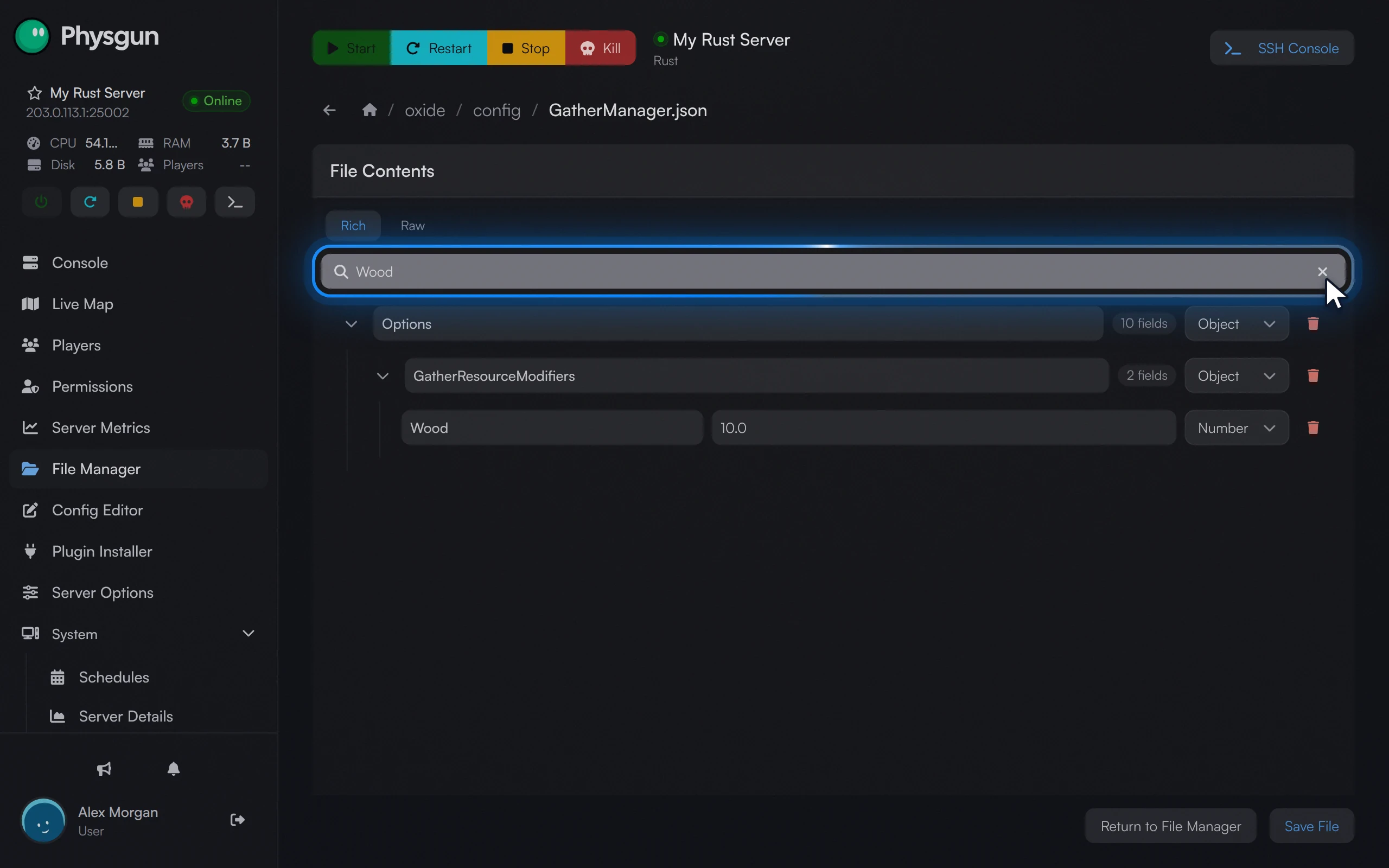 Find a rateType Wood in Search settings to jump to its rate.
To change a rate here, edit the number, select Save File, then run this in the Console so the plugin reads the file again:
oxide.reload GatherManagerTest it in game
Join your server and hit a tree. With Wood at 10x, each hit gives about ten times the wood you would get on a vanilla server. To check the quarry and survey rates, place a Mining Quarry or throw a Survey Charge. Players can type /gather in chat to see the current rates.
You can also run the gather.rate commands from the F1 console in game, as long as you are an admin. The Owner ID setting only makes you an admin when the server is first installed or reinstalled. On a server that is already running, run this in the Console with your own SteamID64, then reconnect:
ownerid 76561198979425569 "Anthony"Install it without the panel
On any Rust server that already runs Oxide, you can also install the plugin by hand.
- Download
GatherManager.csfrom the plugin’s page on uMod: umod.org/plugins/gather-manager. - Upload the file to the
oxide/pluginsfolder. In the File Manager, open that folder, select New, then Upload. - Watch the console. You see
GatherManager was compiled successfully, thenLoaded plugin Gather Manager. You do not need to restart.
The commands and the config file then work the same way. On a server that runs Carbon instead of Oxide, the folders are carbon/plugins and carbon/configs, and c.plugins lists the loaded plugins.
If it does not work
- The server is stuck on Starting after you installed the plugin. Select Kill, delete the
oxidefolder in the File Manager, then select Start and wait forServer startup complete. Then, in the Plugin Installer, open the Installed tab, select Uninstall on GatherManager and install it again. - The console does not recognise
gather.rate. Check that Modding Framework is set to oxide and that the server has restarted since you changed it. Runoxide.plugins: if Gather Manager is not listed, install it again or check thatGatherManager.csis inoxide/plugins. - Rates look unchanged. Gather rates do not change loot, and barrels and loot that already exist stay the same. Test on a tree or ore node, and check the values in
GatherManager.json. - You get much more than expected. You probably set
dispenser.scaleas well asgather.rate. Set the scale back withdispenser.scale tree 1(and the same fororeandcorpse).