Bringing friends together across different versions of Minecraft shouldn’t be a technical nightmare, and GeyserMC is the bridge that makes it happen. This powerful middleware allows Bedrock Edition players to join a Minecraft Java server as if they were native users, translating packets in real-time. By installing the plugin version into your plugins folder or running Geyser standalone, you open your world to users on Android, iOS, and consoles like Xbox or PlayStation.
Setting up this cross-play environment involves a few critical steps:
- Choose Your Version: Download the JAR file for your server type — Geyser-Spigot for a plugin setup, or the standalone version for proxy servers.
- Configure Ports: Match the Bedrock port in your Geyser config to your server’s IP, using UDP for port forwarding.
- Handle Authentication: Install Floodgate alongside Geyser so Bedrock players don’t need a separate Java Edition account to join.
Once configured, your Java Edition server becomes a universal hub where every device can connect and play together seamlessly.
Need a server to run GeyserMC on? Physgun’s Minecraft server hosting gives you full file and plugin access so installing and configuring Geyser is quick and straightforward.
Should You Run Geyser Standalone or as a Plugin?
Geyser Standalone
The standalone version acts as its own server edition, replacing the use of Forge, Fabric, or Paper. Use this on a proxy server — it’s best suited for vanilla servers with cross-platform compatibility or large networks similar to Hypixel.
Geyser Plugin/Mod
The plugin/mod version is best for smaller servers or servers running mods. It’s simpler to install and manage, but may not be ideal for large communities or networks.
Installing GeyserMC on Your Minecraft Server
-
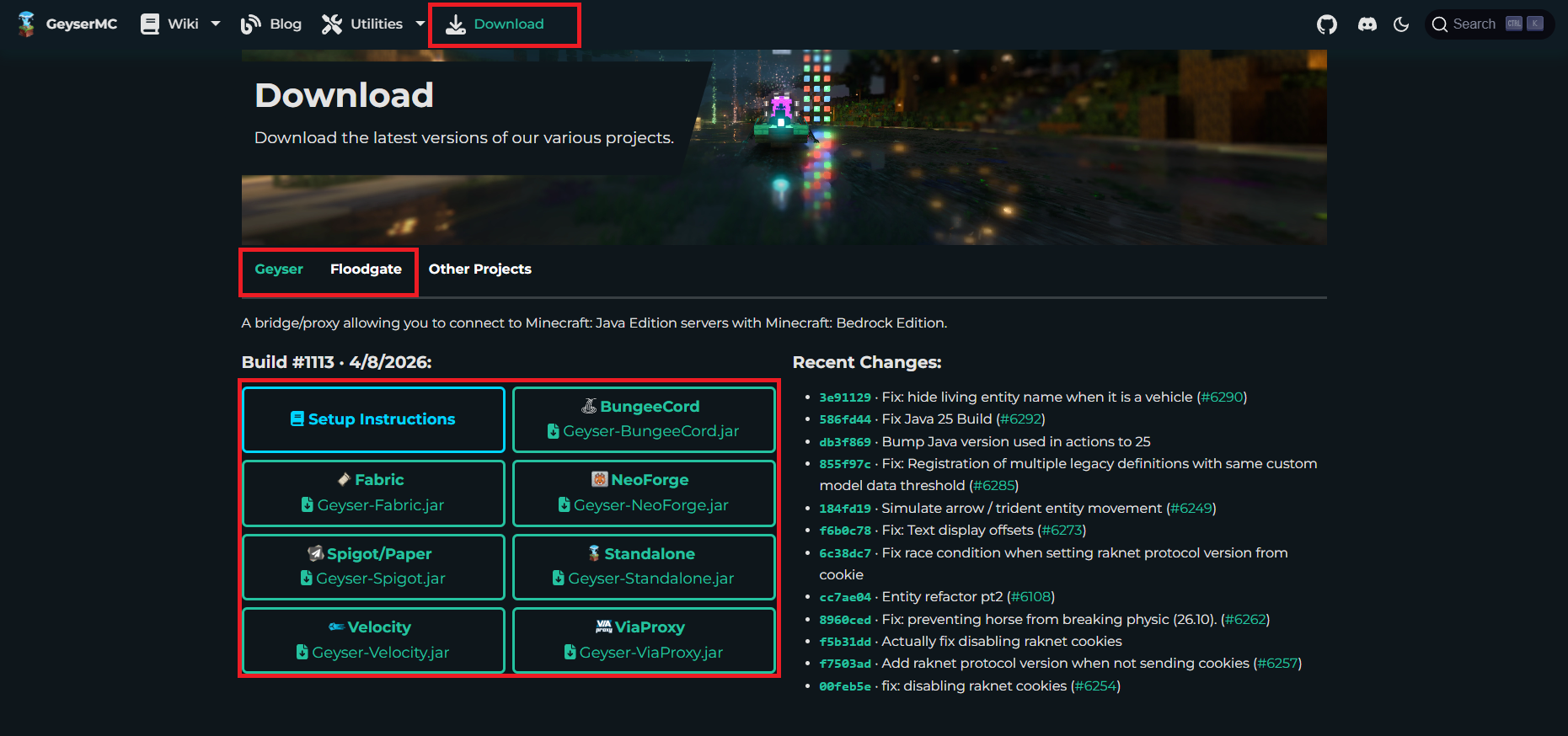
Visit the GeyserMC website and click the Download tab.
-
Select the JAR file for the edition of Minecraft you’re running. Geyser supports BungeeCord, Fabric, NeoForge, Spigot/Paper, Velocity, ViaProxy, and a standalone version.
-
Switch to the Floodgate tab and download that JAR file too. Think of them this way: Geyser is the compatibility layer, while Floodgate is what actually authorizes Bedrock players to connect.
-
Open your server’s files and navigate to your plugins or mods folder.
If you are using the standalone version, skip this step and continue to the configuration section below.
-
Drag and drop both JAR files into the folder.
-
Restart your server to install the plugins.
Configuring GeyserMC
Once installed, Geyser and Floodgate will generate their config files. Open plugins/Geyser/config.yml (for Fabric servers this will be at config/Geyser/config.yml, and for the standalone version it will be in your server’s main folder).
Make the following changes:
- Under Bedrock settings, set
clone-remote-porttotrue. - Under Java settings, set
auth-typetofloodgate.
Next, navigate to your plugins/floodgate folder and copy the key.pem file into your Geyser config folder. This encryption key allows Bedrock players to skip Java login authentication and connect securely.
Finally, open server.properties and set:
enforce-secure-profile=falseWithout this, players on other platforms won’t be able to send chat messages.
Also double-check that your Bedrock port matches your server’s forwarded port, and that the Java IP and port in the config match your server.
Once done, restart your server or run geyser reload in your server console to apply the changes.
Conclusion
Your server is now open to Bedrock and Java players alike. Keep in mind that some Bedrock players on console (Xbox One, Nintendo Switch) or mobile may be unable to join third-party servers depending on their platform — but that’s a platform limitation, not a Geyser one.
GeyserMC is one of the most powerful tools available for Java Edition servers, and once it’s configured, it’s straightforward to maintain. If you run into any issues, check our Help Center or join our Discord for assistance.