Starting a Craftoria Minecraft server is the best way to experience this massive modpack’s blend of technology and magic with your friends. Craftoria is known for its balanced progression, offering a journey where you can master powerful spells in Ars Nouveau or build complex machinery to automate your world. Because this pack includes hundreds of mods and new structures, setting up a dedicated server with powerful hardware is necessary to maintain high performance as you explore distant dimensions.
Want Craftoria up and running in minutes? Physgun’s Minecraft server hosting includes a built-in Modpack Manager that installs Craftoria in just a few clicks — no manual file transfers needed.
To get your Craftoria server online, follow these essential steps:
- Install the Server Files: Download the Craftoria modpack installer and upload the files to your server via FTP or the mod manager.
- Configure Java and RAM: Ensure your hosting plan has enough memory — running a modpack of this scale requires optimized settings.
- Launch and Join: Start the server and make sure your client modpack version matches the server files exactly to avoid connection issues.
Prepare Your Minecraft Server Host
Before installing Craftoria, choose a reliable hosting provider that supports modded Minecraft. Physgun is an ideal choice, offering optimized performance and infrastructure tailored for modded environments.
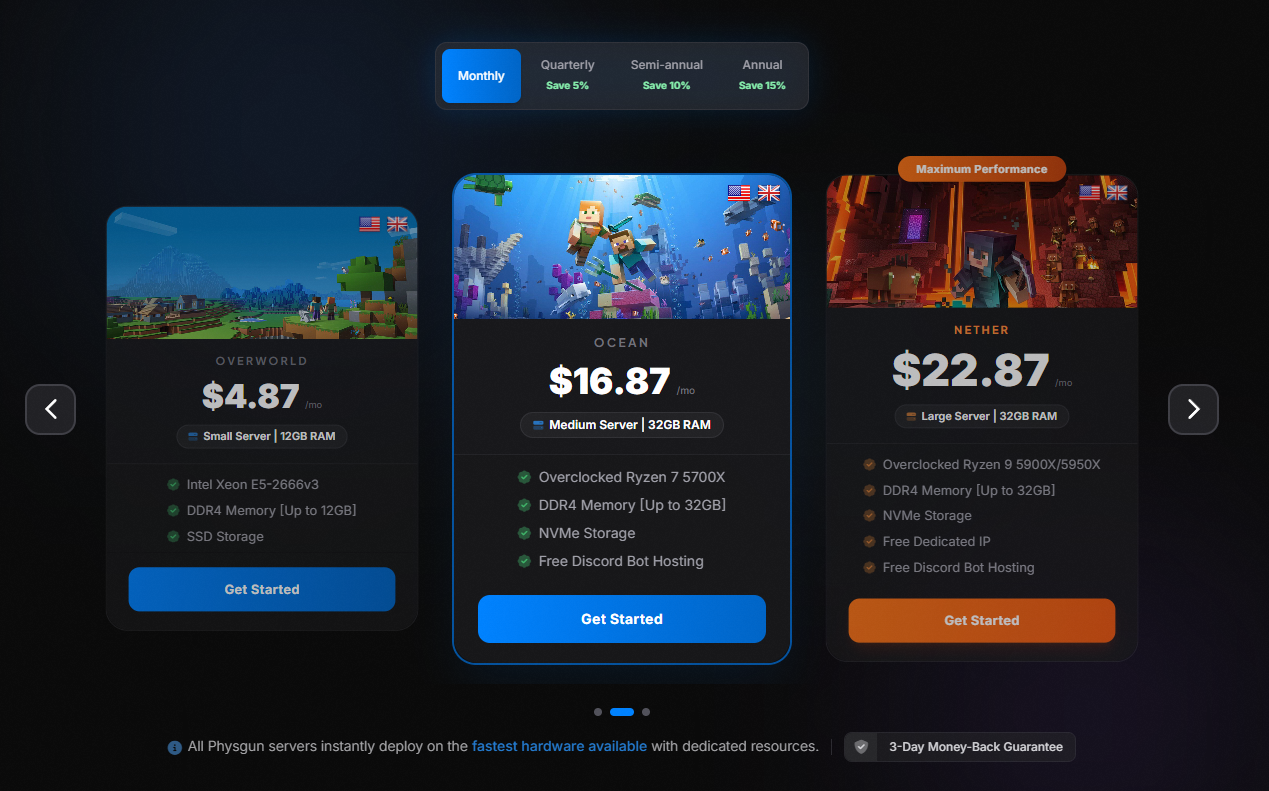
When selecting a plan, ensure it includes at least 8 GB of RAM. Craftoria is resource-intensive, especially when running automation systems and magic effects — lower memory allocations can lead to crashes or lag.
Your hosting provider should also offer:
- FTP access for uploading server files.
- A server console to manage commands and monitor logs.
How To Install Craftoria Through Physgun
Creating a Craftoria server through Physgun takes just a few clicks:
- Choose and purchase a Minecraft hosting plan — we recommend 8 GB RAM or more for Craftoria.
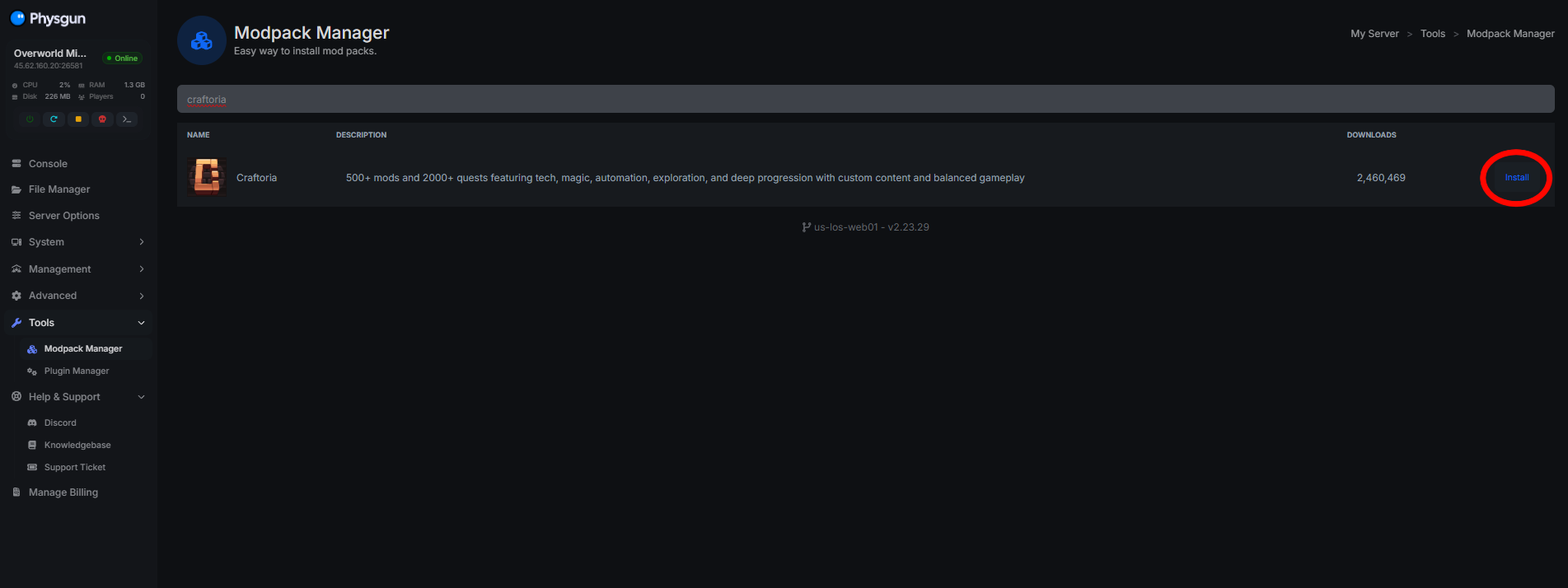
- Once purchased, navigate to the Physgun GamePanel and click on your Minecraft server.
- Head to the Tools section in the left-side navbar and click Modpack Manager.
- Search for Craftoria in the search bar, then click Install.
- Wait for the modpack to install. Once complete, start your server and get playing!
How To Install Craftoria On a VPS
-
Create a full backup of any existing server files before making changes, so you can restore if something goes wrong.
-
Download the Craftoria server pack from the official modpack page or a reputable platform. Confirm it’s compatible with Minecraft 1.21.x and NeoForge.
-
Upload all server files via FTP using a client like FileZilla. Navigate to your server root directory and upload all Craftoria files, including the server JAR, config files, and modpack bundles.
ftp -n <host> <<EOF user your_username your_password cd /home/your_username/server put craftoria-server.jar put config/ put mods/ quit EOF -
Install the correct version of NeoForge matching Minecraft 1.21.1 to ensure compatibility with all mods.
-
Start the server once to generate initial config files and verify mod compatibility.
java -Xmx8G -jar craftoria-server.jar nogui
Configure Server Mods
Once the server is running, fine-tune the mod environment for stability and performance:
- Replace default config files with those provided by the Craftoria modpack. These control spell casting, automation behavior, and world generation.
- Install all required mod dependencies — some mods rely on others, so ensure every dependency is present and correctly named.
- Match client and server mod lists exactly — mismatched mod lists cause crashes or missing features.
- Adjust memory allocation in your server start script. For optimal performance use
-Xmx8G(max 8 GB) and-Xms4G(initial 4 GB).
Tip: Always keep a copy of your original modpack folder for future updates or troubleshooting.
Troubleshooting Common Craftoria Server Issues
If your server crashes or fails to launch:
- Check the server logs at
server/logs/latest.logfor mod-related errors or memory overflow warnings. - Restore from a backup if the world becomes corrupted or unstable.
- Update mods individually to isolate crashes — start with the latest version of core mods and test incrementally.
Note: Always verify that mod versions match both the server version and the NeoForge version in use.
FAQ
Can I run Craftoria on a vanilla Minecraft server? No. Craftoria requires a modded environment and NeoForge — it cannot run on vanilla servers.
How do I update the Craftoria modpack? Log in to your hosting control panel, navigate to the modpack section, and select Update Modpack. Always back up before updating.
What support is available? Physgun offers 24/7 support via live chat and ticket system, accessible directly through the control panel or the support page.
Next Steps
- Invite friends to join your server.
- Customize the world with new structures and quests.
- Explore the magic and technology systems to unlock powerful spells and machines.
With your Craftoria server up and running, you’re ready to begin an unforgettable journey into a world where technology and magic unite.