Disabling the End on a Minecraft server is a common move for admins who want to limit progression, keep things focused on survival building, or stop players from accessing the Ender Dragon fight. The process is straightforward on most server types — it comes down to locating the right configuration file and setting allow-end to false. The exact steps vary slightly depending on whether you’re running Bukkit, Spigot, Paper, or a mod loader, and some setups may require a plugin or mod instead. This guide covers all three methods so you can get the End dimension disabled without breaking anything else.
Need a server to manage? Physgun’s Minecraft server hosting gets you set up in minutes.
Methods to Disable the End
- bukkit.yml toggle — simplest, works on most Bukkit derivatives (Spigot, Paper)
- Plugins — give you granular control over portal behavior at runtime
- Mods — required for pure Forge, Fabric, or NeoForge servers
Method 1: Disable the End via bukkit.yml (Recommended)
- Stop your server completely
- Open bukkit.yml in the root of your server folder
- Locate the line:
- Change it to:
- Save the file and restart the server
To verify, have a player try to use an Eye of Ender — if it disappears without creating a portal, the toggle is active. End portals will not activate and the Ender Dragon will not spawn.
Method 2: Use a Plugin (More Control)
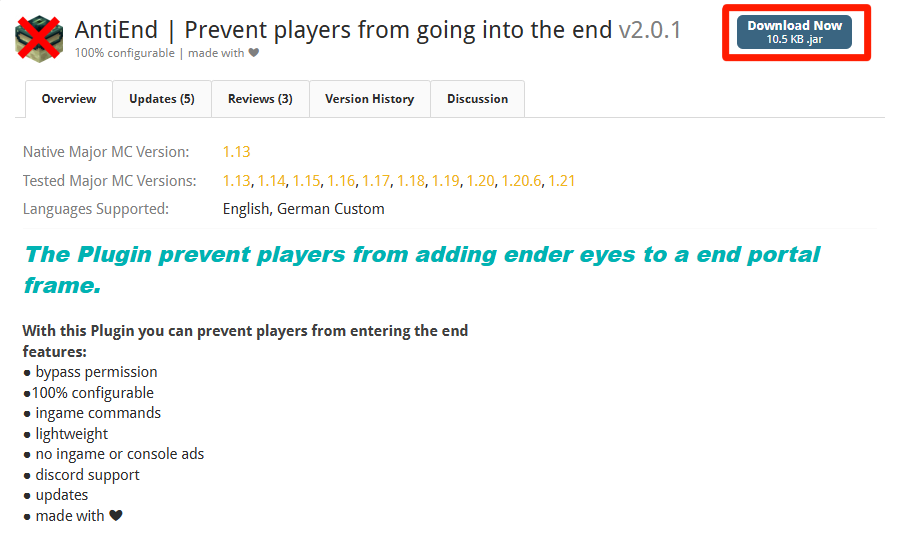
A popular choice is AntiEnd for Spigot/Paper.
Install
- Download the latest version of the plugin
- Upload the
.jarfile to your server’splugins/folder - Restart the server to load the plugin
Configure
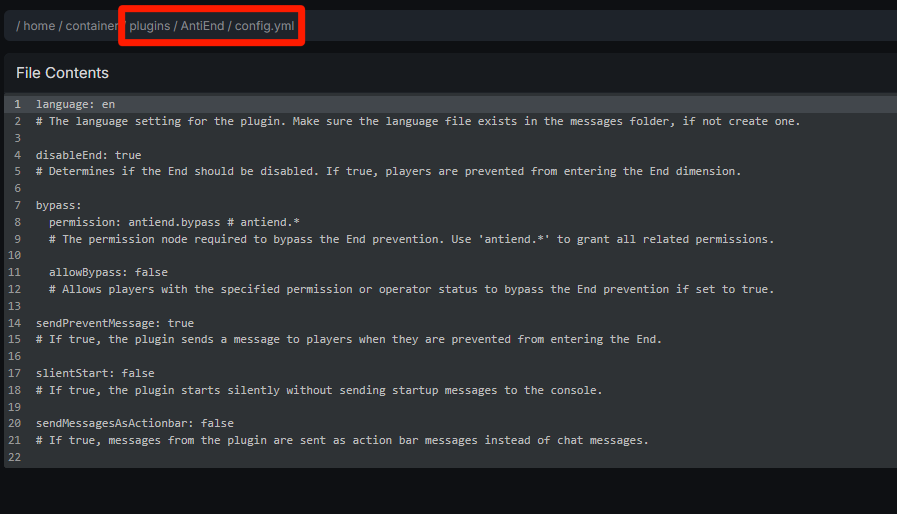
The plugin generates a config file in plugins/AntiEnd/. Open it and adjust as needed:
With the plugin you can also toggle the End at runtime with /rp toggle end without a full restart.
Note: Some other plugins (e.g., world-border or dimension-control tools) may interfere. Disable conflicting plugins if you notice unexpected behavior.
Method 3: Forge / Fabric / NeoForge (Mods)
For mod-only servers, you need a mod that disables portal activation. AntiPortals is commonly used.
- Download the version matching your Minecraft version
- Place the
.jarin your server’smods/folder - Restart the server
Warning: Mods that change dimension handling can cause world-generation conflicts if other mods also modify dimensions. Test on a backup world first.
Re-Enabling the End
- In bukkit.yml, set
allow-end: trueand save - Remove or deactivate any plugins or mods that block portal activation
- Restart the server
After restarting, placing an Eye of Ender should create a portal frame and players can travel to the End normally.
Troubleshooting
End still accessible after the change
- The server may not have fully restarted — try a full stop/start rather than a reload
- You may have edited the wrong config file; some control panels keep a copy in a different directory
Changes not saving
- Check file permissions — the server process must have write access to
bukkit.yml - Some hosting panels overwrite config files on each start — edit through the panel’s built-in file manager instead
Plugin or mod conflicts
- Verify the plugin/mod version matches your Minecraft version
- Check the server log for error messages indicating a conflict with another plugin
FAQ
Can I disable only the End portal but keep the dimension accessible for events?
Yes. With a plugin like Restricted Portals, set end-portal.enabled: false while leaving allow-end: true. The dimension remains reachable via commands or teleporters.
Do players lose inventory when the End is disabled? No. Disabling the portal only prevents entry — existing End inventories stay intact on the server.
Will disabling the End improve server performance? It removes the need to load the End dimension, which can reduce memory usage on larger servers, but the impact is usually modest.