Switching maps on a The Isle server isn’t complicated, but the steps differ depending on whether you’re using a game panel or editing server files directly. The Isle has several maps to choose from, each with different layouts, spawn zones, and community population, and the default map isn’t always the right fit for every server. Get the map line wrong in your config and the server either loads the old map or fails to start. This guide walks through how to change the map on a The Isle dedicated server, covering both the game panel method and manual file editing.
 Finding the Right Map for Your Hosted or Dedicated Server
Available Maps for The Isle: Evrima
The Evrima branch of the game, as of now, only supports the Gateway map, so if you’re running an Evrima server, you’re unfortunately out of luck if you want to change it. However, if you’re running a VPS or Dedicated server that can be switched to the Legacy branch of the game, you have far more options.
Available Maps for The Isle: Legacy
The Legacy Branch of The Isle supports more maps than Evrima since it had more time to cook before the developers rebooted to Evrima. If you’re running the Legacy Branch on your server, you have access to the following maps:
-
Spiro
-
V3
-
Thenyaw
Using Modded Maps
Note: Modded maps are only supported on Legacy Edition. You’re going to have a much harder time using them on Evrima, if you can use them at all.
Some community servers also support modded maps using custom files. We have a full guide on installing mods for The Isle here on our Help Center. To use a modded map, simply add the required files to your TheIsle/Content/Paks folder and follow the rest of the steps as normal.
Setting a New Map in Your Game.ini File
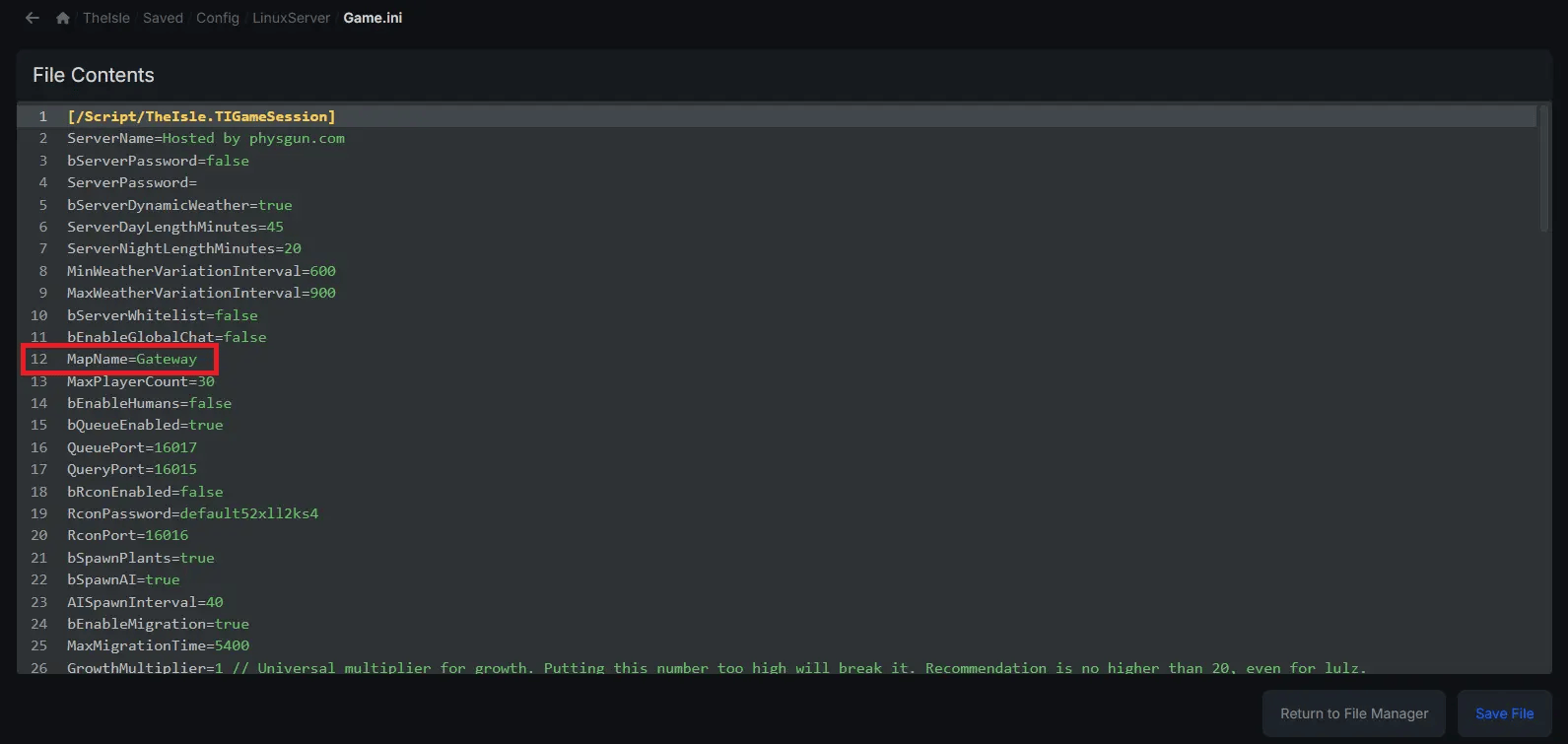
Now that you’re aware of your options, you can change the map in your server’s configuration file. To do so:
-
Visit your server panel or open your dedicated server folder.
-
Stop your server.
-
Navigate to the TheIsle/Saved/Config folder.
-
Inside, you should either see Linux Server or Windows Server, depending on the machine you’re hosting on. Click whichever folder your server has.
-
Open the Game.ini file.
-
Find the MapName field and change the name by pasting one of the options listed above.
-
Save your file and start the server.
If everything was entered correctly, players should be able to load in to your world and play the new map. If you find that it’s not working correctly, check your console logs for errors.
Conclusion
Changing the map on a The Isle server is a quick process once you know which branch of the game you’re running and where the map settings are stored. Evrima servers are currently limited to Gateway, while Legacy servers still support several official maps like Spiro, V3, and Thenyaw. Whether you’re using a hosting panel or editing the Game.ini file manually, it’s as simple as updating the map name, saving the changes, and restarting the server. If the server fails to load afterward, double-check the map spelling and make sure your current game version supports the selected map.
For more assistance and answers, you can join our Discord, make a ticket, or check out the official The Isle Discord and ask around. Hopefully, you found this answer helpful and now have the information necessary to get your The Isle server working properly!