FastDL is one of the most important tools for Garry’s Mod server owners looking to improve their player’s experience. While the Steam Workshop makes distributing addons easier than ever, large collections can lead to longer download times when players connect to your server.
FastDL provides an alternative by allowing servers to host their custom assets on a dedicated web server, giving players a faster and more reliable way to download required content. In this guide, we’ll cover what FastDL is, how it compares to the Steam Workshop, and how to set it up using both Physgun’s built-in tools and a manual setup.
FastDL vs Steam Workshop
The Steam Workshop is the tried and true method for Garry’s Mod server content. When a server uses a workshop collection, Garry’s Mod automatically downloads and mounts the required content before the player joins. While this process is generally reliable, it can increase connection times, especially on servers with many large addons.
FastDL complements the Workshop by hosting assets directly from a web server, reducing connection times. It is commonly used for custom content not published on the Workshop, as well as for assets such as models, materials, sounds, and maps. However, FastDL cannot distribute Lua scripts. That part should be handled through the Workshop or hosted on the server side.
How to Set up FastDL with Physgun (One-Click Solution)
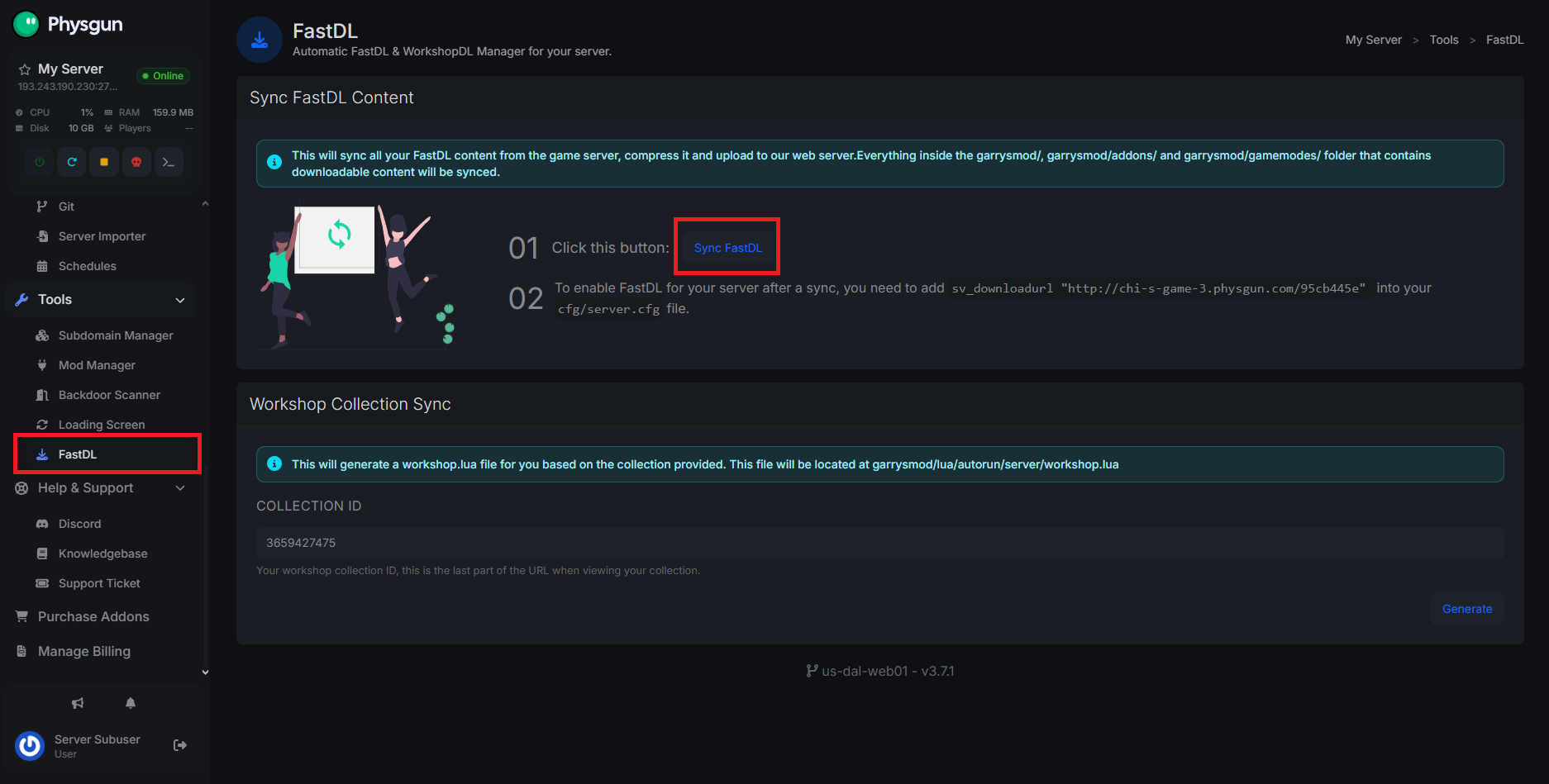
With Physgun, you can set up FastDL as easily as the click of a button. To set up FastDL:
- Visit your Physgun game panel.
- Scroll down to the Tools category and select FastDL.
- Click
Sync FastDL. - Be sure to copy the download URL on this page too.
- Next, open your File manager and open
garrysmod/cfg/server.cfg. - Replace the empty
sv_downloadurlwith the one you copied. - Save the file and start your server.
How to Manually Set Up FastDL
If you’re not hosting with Physgun, you can still set up FastDL for your server; it’s just a bit more complicated. For starters, you need a web hosting service. There are plenty of services online, but the free ones can certainly be dodgy. If you’re ok shelling out a bit of money for a decent host, do that (or just buy a Physgun server  ).
).
Creating a website for FastDL can widely vary between hosts, so make sure to read the instructions provided by the host to safely and efficiently set up your web host.
With whatever host you’re using, make sure it supports FTP/SFTP. The next thing you need to do is connect to it using an FTP client like FileZilla. You can connect using the provided connection address, username, and password from the web host.
In your website’s files, create a folder called gmod inside your website’s document root. This is usually public_html , www , htdocs , html , or site/public .
In this directory, you’ll be creating GMod asset folders for each type of asset you want to download. These should match how they’re listed in your Garry's Mod/garrysmod/ folder. For example: maps for maps, models for props and playermodels, materials for textures, etc. Upload the files you want to have downloaded into the respective folders.
For the best performance, it’s recommended to upload compressed .bz2 versions of your FastDL files alongside the uncompressed files. Garry’s Mod will automatically look for the .bz2 version first, downloading and extracting it if available before falling back to the uncompressed file. Since the compressed files are smaller, they can significantly reduce download times for your players.
Now you need to obtain your download URL. You’ll need to grab the URL of your website followed by /gmod to access the correct file path. Copy that link.
In your server.cfg file, edit or add the sv_downloadurl variable followed by your URL in quotes. For example: sv_downloadurl "https://mywebhost.com/gmod/".
Save your file and boot up your server. Players should notice faster load times for the content you uploaded.
Troubleshooting
Players are not downloading content
- Make sure
sv_downloadurlpoints to the correct URL. - Verify your FastDL files are uploaded with the correct folder structure.
- Test your FastDL URL in a browser to make sure the files are accessible.
Missing textures or models
- Confirm the required files exist in your FastDL directory.
- Make sure file names and folder paths match your
garrysmoddirectory exactly. - Remember that FastDL only downloads assets; it does not distribute addons or Lua scripts.
Downloads are still slow
- Make sure your files are compressed using
.bz2. - Check that your web host has enough bandwidth.
- Avoid using unreliable free hosting services that may throttle downloads.
- Clear up space in your server’s content. Don’t bloat it.
Conclusion
FastDL remains a valuable tool for Garry’s Mod server owners who need a reliable way to distribute custom content. While the Steam Workshop is excellent for managing addons, FastDL provides better control over custom assets such as maps, models, materials, and sounds.
For Physgun users, FastDL can be configured in just a few clicks, making it easier than ever to optimize your server’s downloads. For everyone else, the manual setup process takes a little more work but provides the same benefits once configured properly.
With FastDL set up correctly, players can spend less time waiting for downloads and more time enjoying your server.