Cheat-protected commands like impulse 101 only work on a Garry’s Mod server when sv_cheats is set to 1. It is 0 by default, so players who try one get “Can’t use cheat command … in multiplayer, unless the server has sv_cheats set to 1.” Once you turn it on, cheats work for every player on the server, not just you or your admins. Some cheat commands can break normal sandbox play or let players abuse the server, so only turn it on where you trust the people who join.
All you need is access to your server in the Physgun Gamepanel. The Config Editor only works while the server is offline, so if it is running, select Stop at the top of the page and wait until the status shows Offline.
Turn on cheats
- With your server offline, select Config Editor in the menu on the left.
- In the Key box, type
sv_cheats. - In the Value box, type
1. - Select Add Setting. A new
sv_cheatscard appears at the end of the list of settings. - Select Save All at the top right of the page.
The page does not show a message after you save. Your change is written to your server’s server.cfg, which the server reads every time it starts, so cheats stay on after restarts.
If sv_cheats is already in the list, don’t add it a second time. Change the value in its card to 1, select the card’s Save button, then select Save All.
Start the server and check
- Select Console in the menu on the left.
- Select Start and wait until your server shows Online.
- Click the command box at the bottom of the console (it reads Type a command…) and type
sv_cheats. - Press Enter.
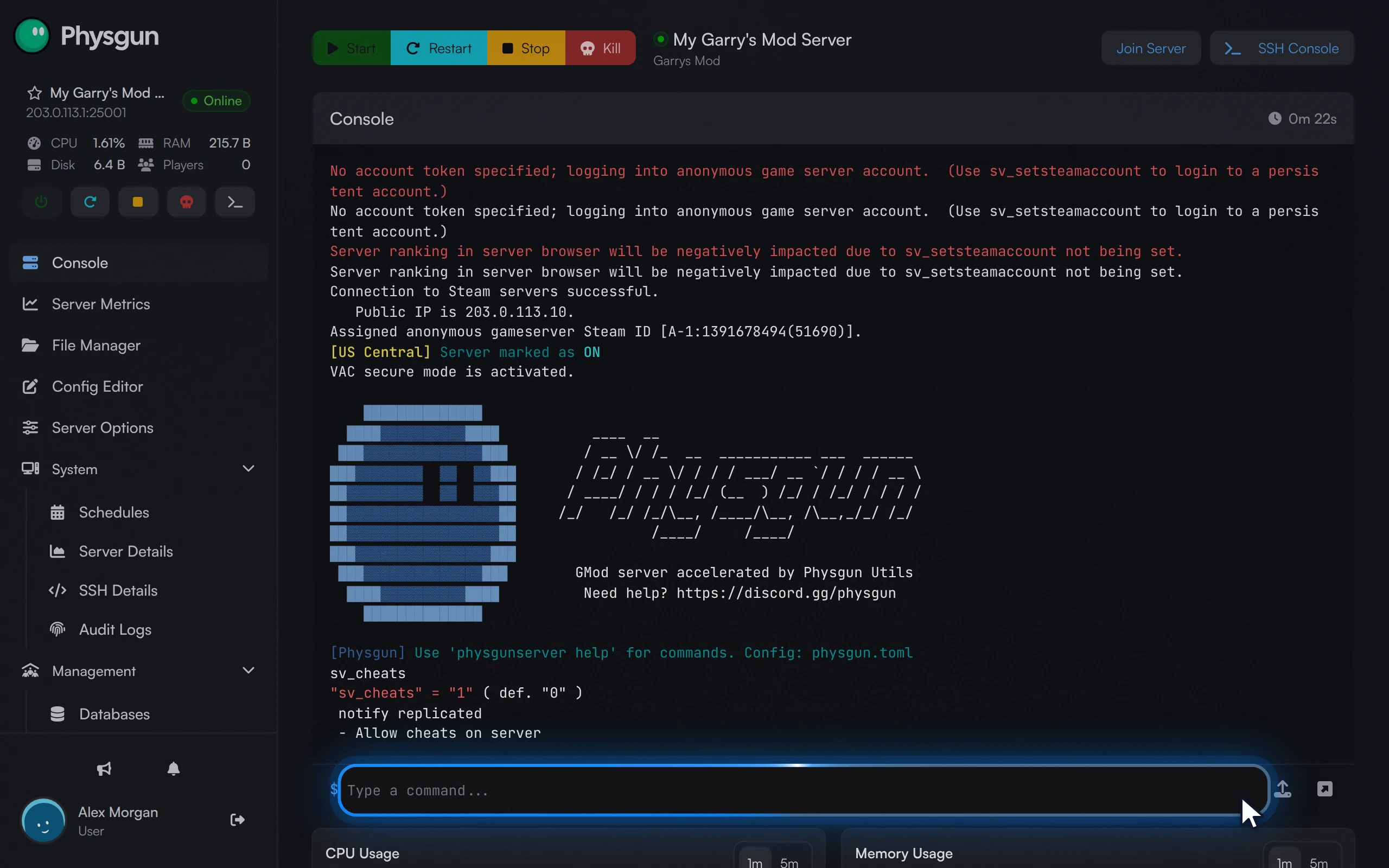 Confirm cheats are onPress Enter. The console shows sv_cheats is 1, so cheats are on.
The console replies with the current value:
"sv_cheats" = "1" ( def. "0" )If it shows "1", cheats are on. To test it in game, join your server, open the developer console and run:
impulse 101You should get every Half-Life 2 weapon with full ammo. If you still get the “Can’t use cheat command” message, see the last section.
Turn cheats off
To turn cheats off for good, stop your server, open Config Editor, and either change the sv_cheats value to 0 or select Delete on its card. Then select Save All and start the server again.
To turn them off only until the next restart, type this in the console while the server is running:
sv_cheats 0Without the Config Editor
The manual way works on any Garry’s Mod server, but the Config Editor above is the easier way to keep the setting.
For the current session
With the server running, type this in the console command box and press Enter:
sv_cheats 1Cheats work at once, but only until the server restarts or stops. After that, sv_cheats goes back to 0. Type sv_cheats on its own to check the value at any time.
Admins can also run the same command from the in-game console if they have superadmin or rcon access.
Keep it on after restarts
-
Stop your server.
-
Open the File Manager and go to
garrysmod/cfg. -
Open
server.cfg. If it isn’t there, create a new file with that name. -
Add this line on its own line at the end of the file:
sv_cheats 1 -
Save the file and start your server.
Check it with sv_cheats in the console, as in the section above. The console also prints “Executing dedicated server config file server.cfg” while the server starts, which tells you the file was read.
If it doesn’t work
- Nothing changes: check that the server was Offline while you edited and that you selected Save All, then restart.
- Cheats turn off after a restart: see “Keep it on after restarts” above.
- Two sv_cheats lines: if
server.cfghassv_cheatsmore than once, the last one wins. Delete the extra line so only one value is set. - A player still gets “Can’t use cheat command”: ask them to reconnect after the server has restarted with cheats on, and check the value with
sv_cheatsin the console.