The True PVE plugin is one of the most powerful PvE management plugins available for Rust servers. Rather than relying on Rust’s built-in server.pve setting, True PVE gives server owners full control over combat and damage through customizable rulesets, allowing you to define exactly what can damage what under different circumstances.
Whether you’re building a fully cooperative PvE server, creating safe zones with Zone Manager, scheduling PvE and PvP events throughout the day, or fine-tuning how NPCs, vehicles, buildings, and deployables interact, True PVE provides an incredibly flexible system to make it happen. In this guide, we’ll cover how to install the plugin, explain its configuration options, and show you the available commands you’ll use to manage it.
Installing the True PVE Plugin
The first thing you’ll need to do is install the plugin on your server. To install the True PVE Plugin:
-
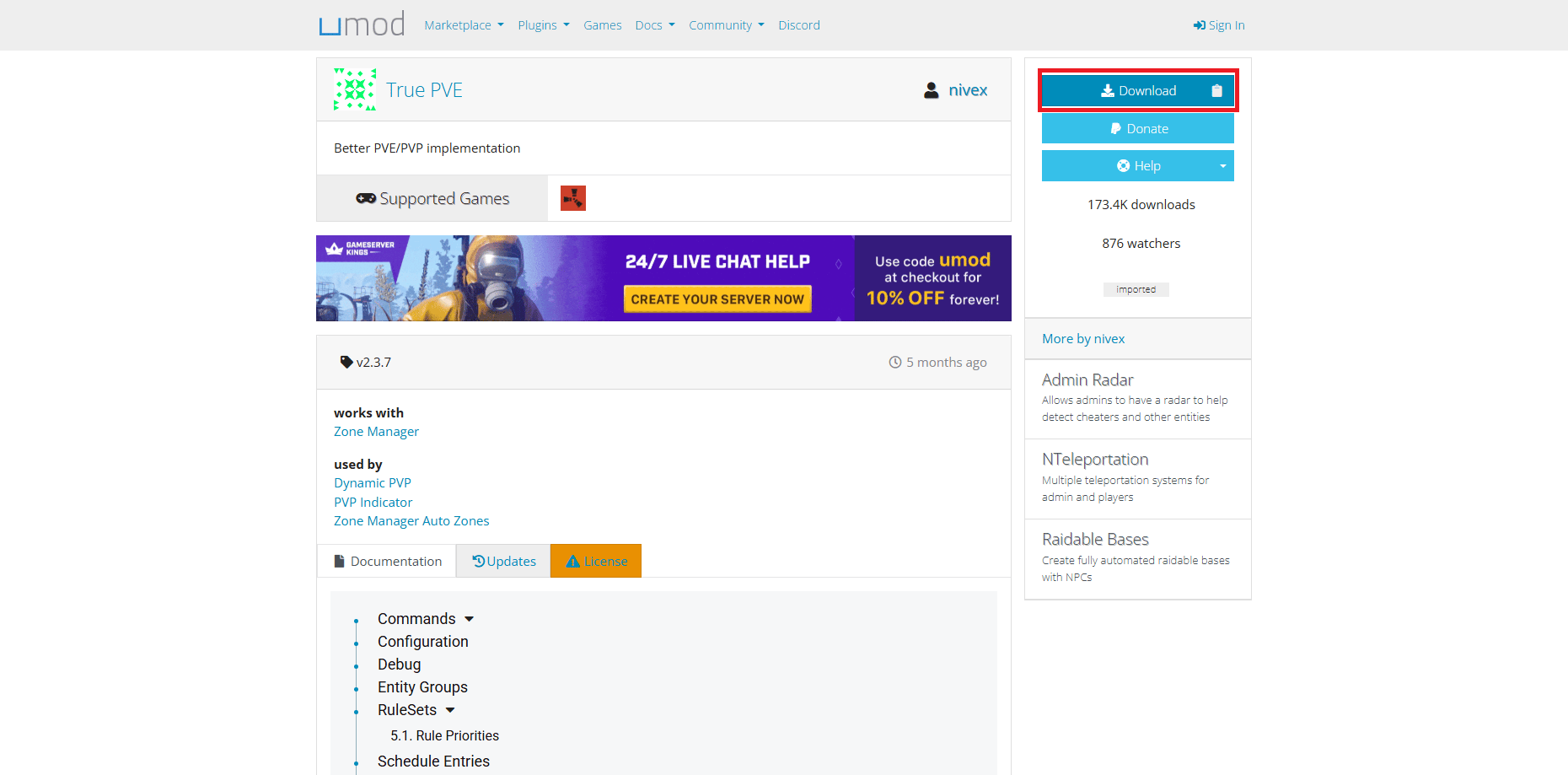
Visit umod.org and find the plugin page.
-
Click download. You’ll receive a CS file on your computer.
-
Open your server files using the Physgun File Manager, SFTP/FTP, or your Windows File Explorer depending on how your server is hosted.
-
Drop your CS file in the oxide/plugins directory.
-
Either restart your server or type
oxide.reload TruePVEin your server console. This will reload the plugin and get it up and running.
True PVE Configuration
Prior Setup
True PVE is intended to replace the base game server.pve rulesets, and the creator recommends that it shouldn’t be used alongside the vanilla Rust PVE systems.
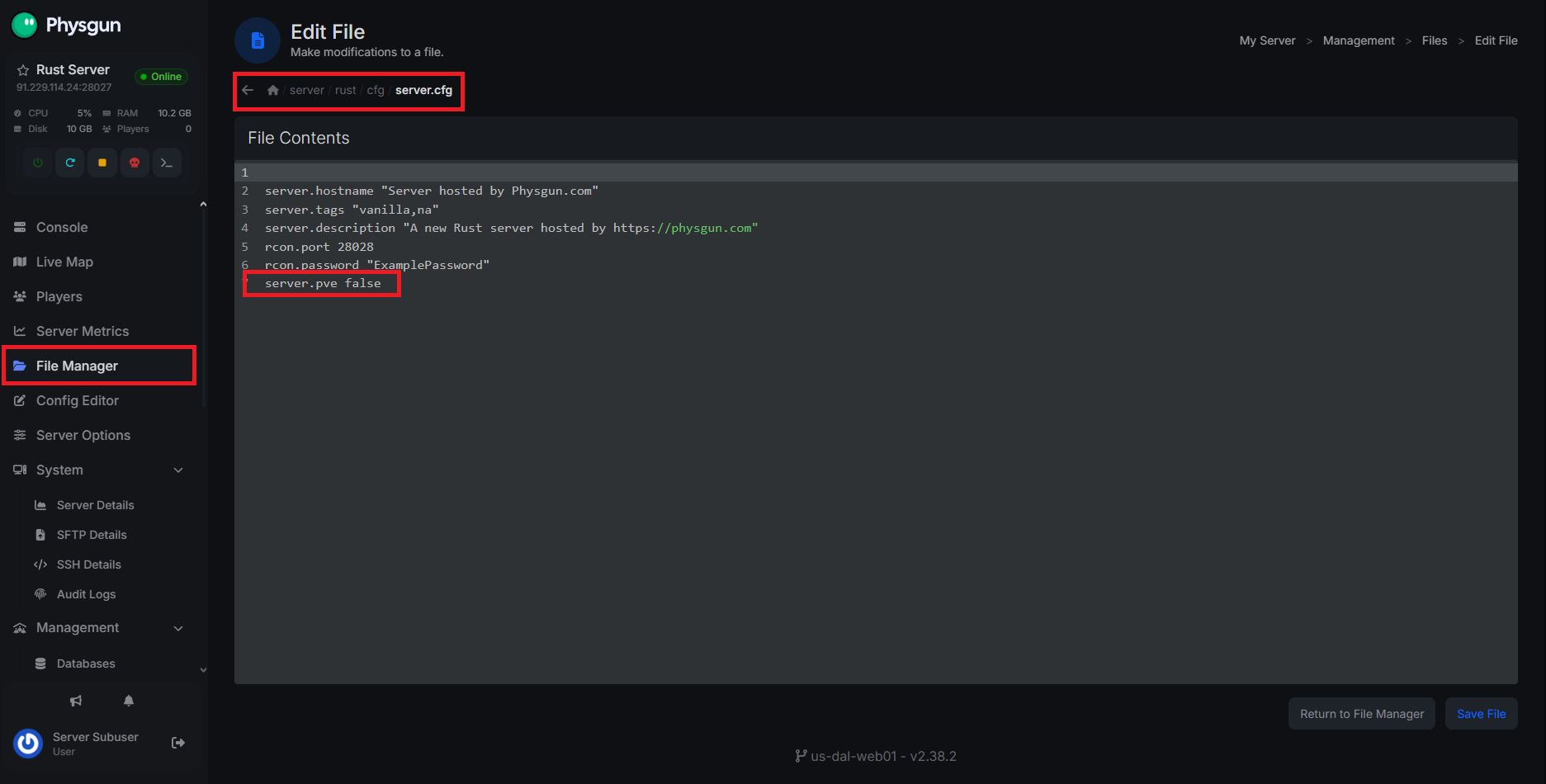
Before you can do anything with the plugin, go to server/rust/cfg/server.cfg in your server files and see if server.pve is enabled. PVE mode is disabled by default, so if you don’t see anything there, you should be fine. If you do see server.pve true or you just want to cover your butt, simply add or edit this line: server.pve false.
Editing the Config File
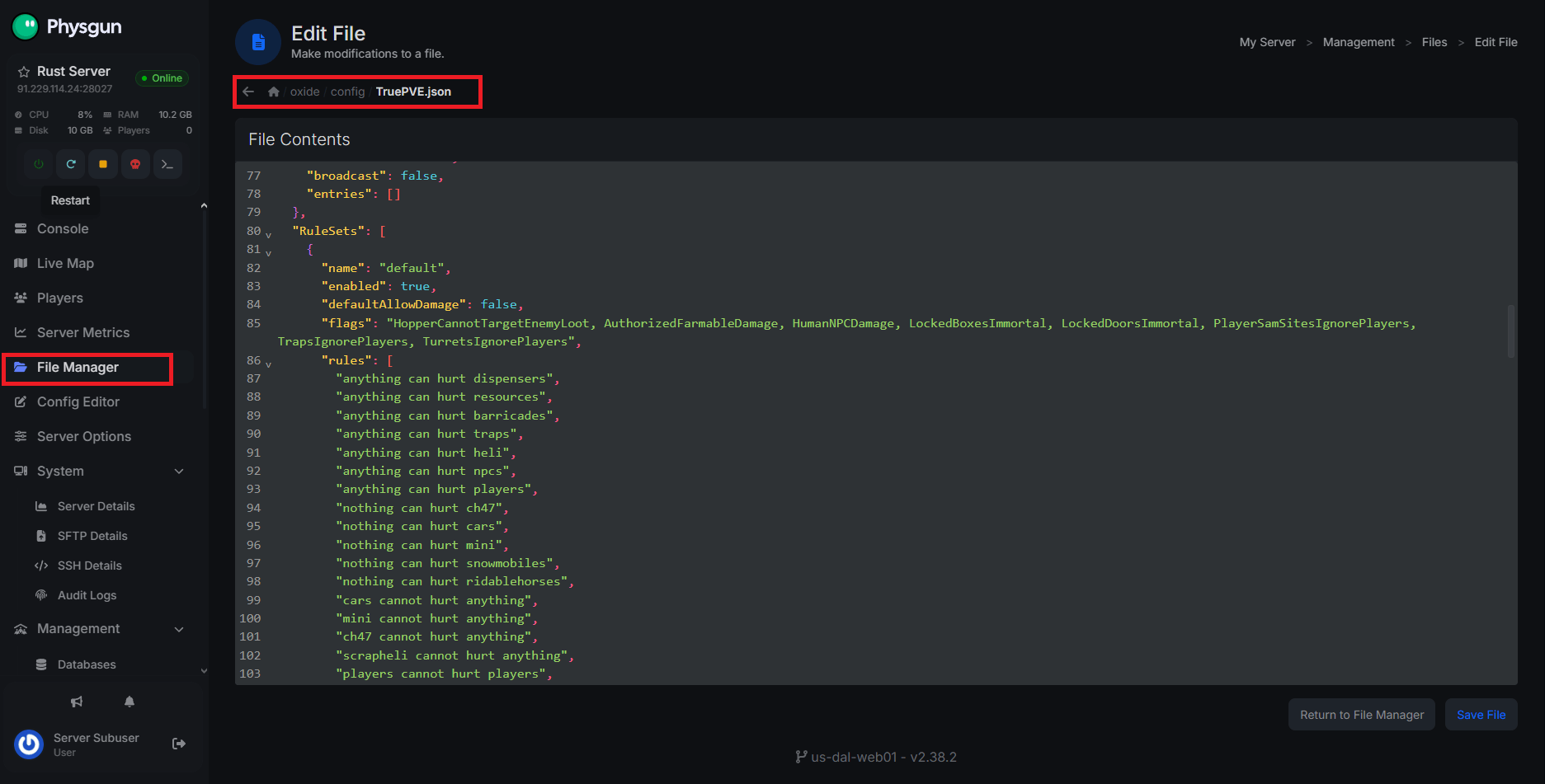
The True PVE plugin offers a ton of configuration options. You can find the config file at oxide/config/TruePVE.json. Make sure you’ve loaded the plugin once before looking for this file, otherwise it won’t be there.
The configuration file includes the following categories:
-
Config Version - This is intended to match the plugin version, don’t mess with this unless you have version mismatches.
-
Default RuleSet - Used to define the Ruleset that the plugin should default to.
-
Configuration Options - Contains a list of global config options, including damage handling, looting, and compatibility settings.
-
Mappings - This is entirely used to map out zones using ZoneManager and assigning rulesets to each zone. If you aren’t using Zone Manager, don’t worry about this.
-
TwigDamage (FLAG) - This is used to apply additional regulations to the TwigDamage ruleset flag to decide whether or not the flag should apply to different material types, including Twig, Wood, Stone, Metal, and HQM.
-
Schedule - This allows you to schedule Ruleset changes based on server time. You can set up schedules using this syntax:
time ruleset message. This can be used to schedule times to enable PVE or create different PVE events.-
Time refers to the day of the week, hour, and minute you want this schedule to trigger. The day of the week is defined using a numeric value between 0-6, representing Sunday-Saturday, respectively; the hour is defined using 0-24; and the minute is defined using 0-59. This is put in a
d:hh:mmformat once you have your values.- An asterisk can be used to represent a daily schedule instead of a specific day of the week.
-
Ruleset refers to the name of the ruleset that you want to be active when this schedule triggers.
-
Message refers to what you want sent into chat when this schedule triggers.
-
An example might include:
"*:12:23 MyRuleset New Ruleset Changes!!". This will fire every day at 12:23 pm, enabling the “MyRuleset” ruleset, and putting “New Ruleset Changes!!” into global chat.
-
-
Entity Groups - This is where you can set up containers that define a group of entities. Entity groups are called in other areas, so you don’t have to list individual items all the time. In the config file, you can set up an entity group’s name, members, and exclusions.
The name is used when rules need to call different entity groups, members are either types or prefabs that should be included in the group, and exclusions are the opposite of that. For example, your entity group for Storage Containers might contain:-
BoxWoodenLarge
-
BoxWooden
-
CoffinStorage
-
LockerDeployed
-
So on and so forth.
-
-
RuleSets - Rulesets have been referenced several times in this section. These are a set of flags and behaviors used to define configurations that can be swapped around based on the server’s time or your location if you’re using Zone Manager. To set up a ruleset:
-
Set up a name. this is how it’ll be referenced in zones and schedules.
-
Make sure the enabled flag is set to true.
-
Set the defaultAllowDamage flag to either true or false, depending on the purpose of the ruleset. PVE rulesets should always be false, but container or other non-NPC entities may have this set to true. This just determines whether or not the ruleset should block damage.
-
Set up some flags; see the Ruleset Flags section for details.
-
Lastly, set up some rules. The way rules work is by comparing two rules using a defined behavior to determine whether or not something can damage another. Rules pick up keywords so there’s no need to worry about syntax. Behaviors will pick up words like “can”, “can’t”, or “cannot”, while rule arguments will pick up specific rule names or broad statements like “anything”, “nothing”, “everything”, “all”, and “none”. Some examples of functioning rules inlude:
-
Rule1 can’t hurt Rule2
-
Anything can hurt Rule2
-
Nothing can’t hurt Rule2 (This is a double negative and will do the same as Anything can hurt Rule2)
-
Everything can hurt Rule2
-
-
Ruleset Flags
| Flag | Description |
|---|---|
| Overrides Rules | All flags ignore evaluation of rules if in use. Does not apply to: TrapsIgnorePlayers, TurretsIgnorePlayers, TurretsIgnoreScientist, StaticSamSitesIgnorePlayers, and PlayerSamSitesIgnorePlayers that allow exceptions in entity groups only |
| Ignores All Rules | Rules are never evaluated. Entities that require certain rules (such as helis) may not function properly. TruePVE does NOT handle structure decay TruePVE does NOT handle looting. Use the Prevent Looting plugin Animal damage rules are not evaluated. All damage is allowed to and from this object AdvancedChristmasLights rules are not evaluated. You must be able to build to damage this object. GrowableEntity rules are not evaluated. You must be able to build, or be the owner, to damage this object |
| AuthorizedDamage | A very niche flag and is grossly misunderstood. When not paired with CupboardOwnership, AuthorizedDamageRequiresOwnership, or AuthorizedDamageCheckPrivilege, the following will be evaluated: If the entity is a mount or samsite then rules will be checked to see if any can block the damage. If not, then the damage will be allowed when the entity is not owned by any player, or if it is owned by the player or their ally. Otherwise rules will be evaluated last. When AuthorizedDamage is paired with CupboardOwnership it will allow damage when no tool cupboard is protecting the entity, or when there is a cupboard and you are authorized. Otherwise damage is blocked (meaning rules are not evaluated.) When AuthorizedDamage is paired with AuthorizedDamageRequiresOwnership it will evaluate rules for vehicles first, and block damage when said rule does not allow it. Otherwise, damage is allowed when the entity is not owned by a player (with the exception of minicopters), or when the player owns the entity, or the player is an ally with the owner. If nothing has allowed the damage by this point then it’s blocked (meaning rules are not evaluated.) When AuthorizedDamage is paired with AuthorizedDamageCheckPrivilege it will protect by cupboard authorization for decay entities, player helicopters and tugboats only. If it is a different entity, or if damage was not authorized, then AuthorizedDamage, AuthorizedDamageRequiresOwnership and/or CupboardOwnership will be checked. If damage is still not authorized by this point then rules will be evaluated last. |
| AuthorizedFarmableDamage | A standalone/independent flag where the owner and ally can hurt hatched chickens |
| HopperCannotTargetEnemyLoot | Prevents enemy hoppers from looting dropped items and corpses |
| AnimalsIgnoreSleepers | Prevents animals from targetting sleeping players |
| SuicideBlocked | Block suicide |
| FriendlyFire | Enables friendly fire among teammatesclanmateses, and friends |
| SelfDamage | Allow players (usually) to damage themselves. This usually applies to AOE devices such as bombs. |
| CupboardOwnership | When enabled with AuthorizedDamage will treat entities outside of cupboard range as unowned, and entities inside cupboard range will require authorization. |
| TwigDamage | Allows players to damage any twig building blocks regardless of authorization (to encourage sound building practices) |
| TwigDamageRequiresOwnership | Blocks damage to twig except from the owner, an ally of the owner, or when you have TC auth |
| WoodenDamage | Same as the TwigDamage flag but for wood, including wooden boat building blocks on player-made boats in edit mode |
| WoodenDamageRequiresOwnership | Same as the TwigDamageRequiresOwnership flag but for wood (and it requires the WoodenDamage flag instead) |
| NoHeliDamage | Disables heli damage for all other entities not covered by existing heli flags listed below |
| NoHeliDamagePlayer | Prevents heli from hurting players |
| NoHeliDamageQuarry | Prevents heli from damaging quarries |
| NoHeliDamageSleepers | Prevents heli damage to sleepers (this does not check if the player is online!) |
| NoHeliDamageRidableHorses | Prevents damage to ridable horses |
| NoHeliDamageBuildings | Prevents damage to buildings, vehicles and deployables when within TC range (player-made boats are always protected, otherwise server performance would suffer) |
| HeliDamageLocked | Allows heli to damage locked boxes/doors (requires LockedBoxesImmortal or LockedDoorsImmortal) |
| NoPlayerDamageToCar | Prevents player damage to modular cars |
| NoPlayerDamageToMini | Prevents player damage to Minicopter |
| NoPlayerDamageToScrap | Prevents player damage to ScrapTransportHelicopter |
| NoMLRSDamage | Prevents targetting anything with the MLRS, and prevents damage from MLRS rockets that don’t use MLRS to launch |
| HumanNPCDamage | Enables npcs of any type to damage players (it is VERY common for plugins to override this behavior!) |
| NpcsCanHurtAnything | Allows npc to damage anything (LockedBoxesImmortal and LockedDoorsImmortal override this flag) - It is very common for ANY npc plugin to override this flag and give unexpected results. Consult that developer instead. |
| LockedBoxesImmortal | Locked boxes are immortal (_HeliDamageLocked _overrides this) |
| LockedDoorsImmortal | Locked doors are immortal (_HeliDamageLocked _overrides this) |
| ExcludeTugboatFromImmortalFlags | Prevent LockedBoxesImmortal and LockedDoorsImmortal flags from protecting entities on tugboats |
| AdminsHurtSleepers | Admins can hurt sleepers |
| AdminsHurtPlayers | Admins can hurt awake or asleep players |
| ProtectedSleepers | Sleepers are protected from NPC damage |
| TrapsIgnorePlayers | Players don’t trigger traps (not working for bear/snap traps) |
| TrapsIgnoreScientist | Prevents npc from triggering traps |
| TurretsIgnorePlayers | Players don’t trigger turrets (not working for flame turret) |
| TurretsIgnoreScientist | Prevents npc from being targetted by turrets owned by a player (‘ent who’ console command shows a valid steam id) |
| StaticTurretsIgnorePlayers | Prevent turrets (with no owner, such as at monuments) from targetting players |
| SafeZoneTurretsIgnorePlayers | Prevent turrets within safe zones from targetting players (these are green sentry turrets) |
| StaticSamSitesIgnorePlayers | Static sam sites ignore all players, such as from Launch Site or a plugin that has set SamSite.staticRespawn to true. |
| PlayerSamSitesIgnorePlayers | Player sam sites ignore all players, such as from deployed sam sites. If another plugin sets SamSite.staticRespawn to true then this flag will not work for that sam site. |
| SamSitesIgnoreMLRS | Prevent SAM sites from targetting MLRS rockets |
| VehiclesTakeCollisionDamageWithoutDriver | Vehicles will take collision if there is no player seated in the drivers seat |
| VehiclesTakeCollisionDamage | Vehicles take collision damage, do not use rules for this anymore, use this flag only |
| TurretsIgnoreBradley | Prevent plugin turrets from shooting bradley APC |
| LockedVehiclesImmortal | Modular cars will be immune to damage when protected with a code lock |
| StaticTurretsIgnoreScientist | Prevent non-owned turrets and npc turrets from shooting npcs |
Using the True PVE Plugin In-Game
Most of what the True PVE plugin has to offer happens automatically after you configure it, though the plugin does offer some chat and console commands.
True PVE Console Command:
-
tpve.def- Wipe and create default configuration/data -
tpve.sched [enable|disable]- Enable/disable the schedule -
tpve.trace- Toggle tracing; automatically disabled after 5m (hard-coded) to prevent accidental log overfilling. See below for more details about tracing. -
tpve.usage- Show command usage info
True PVE Chat Commands:
-
/tpve_prod- Print out the Type and Prefab name of the entity being looked at (for entity groups) -
/tpve map [name] [target]- Create/update/delete a mapping. [name] is the name of the mapping or the zone ID you are mapping.[target]is an optional parameter defining either the RuleSet name you wish to map to or “exclude” to skip processing. Leaving[target]empty will delete the mapping for[name]
Conclusion
True PVE is much more than a simple PvE toggle. It’s a complete rules engine for controlling combat on your Rust server. With support for custom rulesets, scheduled events, zone-based behavior, and dozens of configurable flags, it allows you to build everything from relaxed cooperative servers to complex hybrid PvE/PvP experiences.
While the plugin’s configuration can seem overwhelming at first, understanding how rulesets, flags, and mappings work opens up an incredible amount of customization. Once configured to match your server’s vision, True PVE largely runs itself, giving you a reliable and highly configurable way to manage player interactions across your entire server.