Mob spawn rates in Minecraft aren’t always obvious to control, but understanding the system makes a big difference — especially if you’re running a mob farm or trying to make a survival world feel more alive. Spawning is governed by a handful of variables: the mob cap, light levels, difficulty setting, and how many chunks are loaded at once. Tweak the wrong thing and you’ll barely see a zombie. Get it right and your farm runs at full efficiency. This guide covers every practical method for increasing spawn rates, whether you’re on a private server or a local world.
Want a server to run your farms on? Physgun’s Minecraft server hosting gets you online in minutes.
How Mob Spawning Works
There isn’t a single setting you can flip to change mob spawn rates in vanilla Minecraft. Instead, spawning depends on how the game checks for valid spawn locations, how many mobs are already nearby, and what type of mobs the game is trying to spawn.
Minecraft periodically attempts to spawn mobs in chunks that are actively loaded by a player. The game looks for valid blocks, enough open space, and proper environmental conditions before placing mobs.
Different mobs have different requirements:
- Hostile mobs (zombies, skeletons, creepers) require darkness — check the block light level where they should spawn
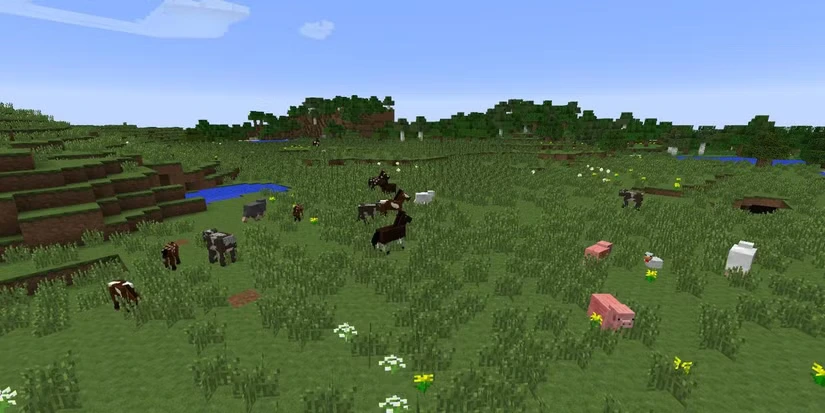
- Passive mobs (cows, sheep, chickens) spawn on grass blocks in their respective biome
- Aquatic mobs (fish, drowned) require water blocks
- Structure mobs (vindicators, guardians) only spawn inside specific structures
- Nether mobs (piglins, ghasts) only spawn in the Nether dimension
Some blocks prevent mob spawning entirely: bottom slabs, carpet, glass, trapdoors, and redstone components.
What Is the Mob Cap?
The mob cap is the maximum number of mobs in a category that can exist in loaded chunks at one time. Once the cap is reached, spawning slows down or stops completely.
This is why caves filled with mobs hurt mob farm efficiency — if too many mobs are already loaded nearby, there’s no room in the cap for your farm to spawn more. Hidden caves are a common culprit for poor farm output.
Increasing Spawn Rates in Java Edition
Java Edition offers the most control over spawn optimization:
- Make sure difficulty is not set to Peaceful — it disables hostile mob spawning entirely. Easy, Normal, and Hard all allow mobs to spawn
- Increase your simulation distance in video settings to widen the area the game processes for mob spawning
- Ensure there’s enough open space — trees, clutter, or a crowded area reduces available spawn tiles
Increasing Spawn Rates in Bedrock Edition
Bedrock uses slightly different spawning behavior. Spawning is calculated per block in a chunk with a 1-in-200 chance for a mob cluster to spawn, with a global limit of 200 mobs and a per-chunk spawn limit of 8 (16 in caves).
To work around these limits:
- Set difficulty to Easy or above — same as Java
- Be aware that other players on the same server fill the mob cap quickly, leaving less room for your spawns
- Expand your spawn area across multiple chunks — limiting yourself to a single chunk with an 8-mob cap is a bottleneck
Increasing Hostile Mob Spawn Rates
If you’re specifically targeting zombies, skeletons, spiders, slimes, and other hostile mobs:
- Lower light levels to 0 on spawn platforms and in caves
- Make sure it’s nighttime if you want mobs to spawn passively — they don’t spawn on the surface during the day without artificial darkness
- Remove grass blocks nearby to prevent passive mobs from filling the cap

Adjusting Spawn Limits on a Minecraft Server
On a server running Spigot, Paper, or Bukkit, you can edit mob spawning through configuration files. For example, bukkit.yml exposes spawn caps and spawn rates per tick for each mob category separately:
Raising monsters increases how many hostile mobs can exist in loaded chunks at once. You can also use a plugin or performance mod to manage entity cleanup, extra mob behavior, or spawn balancing.
Maximizing Spawn Rates with Mob Farms
Putting these mechanics into practice:
- Use open, dark areas for your spawn platform
- Light up surrounding chunks with torches to prevent mobs from spawning outside your farm and filling the cap
- Avoid building underground farms near the surface — surface mobs compete for cap space
- Use water streams or trapdoors to funnel mobs into a kill zone
- Use a long drop to kill mobs automatically — the faster a mob dies, the faster a new one can spawn
- Stay within render range of your farm to keep the chunk loaded — mobs won’t spawn in unloaded chunks

Summary
Increasing spawn rates comes down to controlling the environment: manage the mob cap, eliminate wasted spawn spaces, set the right difficulty, and build efficient farms. Whether you’re farming gunpowder, XP, or just want a livelier world, understanding spawn mechanics gives you the biggest advantage.