

If you want to know how to add bots to a TF2 server, the good news is it’s pretty simple once you know the right console command and server setup. In Team Fortress 2, bots are computer-controlled players that can participate in matches. There are two types of bots: AI bots, which use advanced artificial intelligence to emulate player actions, and Puppet bots, which lack AI and require direct control.
Team Fortress 2 includes official bot support, so you can spawn bots for offline play, fill empty teams, test maps, or practice against AI bots without waiting for human players to join. By default, bots will use standard settings for team, class, and difficulty unless you customize these options.
This guide walks through how to add bots, choose a team, set a class, adjust skill level, and use developer console commands on supported maps. You’ll also learn how navigation mesh data affects bot behavior on your server. AI bots are designed to emulate player actions, while Puppet bots have no AI coding and cannot move or act on their own.
Adding TF2 Bots Through RCON
RCON lets you send console commands to your server remotely without logging into the game client. This is useful if you manage a dedicated server from a website, control panel, or another computer.
To add bots to your TF2 server via RCON:
-
Connect to your server using an RCON tool or hosting control panel.
-
Enter the command tf_bot_add to spawn one bot.
-
To spawn a specific number of bots, use tf_bot_add [desired number], replacing [desired number] with the number of bots you’d like to add.
- For example, tf_bot_add 10 will add 10 bots to your server.
-
To force bots to join a specific team, use tf_bot_add [desired number] [team].
- The team parameter is optional and lets you specify which team the bots join.
-
You can also assign a class to the bots using tf_bot_add [desired number] [team] [class].
- Both team and class are optional parameters for more control. For example, tf_bot_add 2 red sniper will add 2 sniper bots to the red team.
-
You can set bot difficulty level using tf_bot_difficulty 0. The difficulty parameter is optional and can be specified for each bot.
Difficulty levels include:
-
0 = easy difficulty
-
1 = normal
-
2 = hard
-
3 = expert
For precise control over adding specific bots, you can use tf_bot_add [amount] [team] [class] [difficulty]. This allows you to specify the desired number, team, class, and difficulty for each bot.
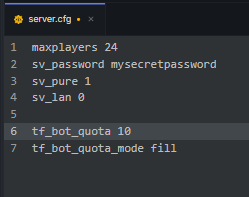
To automatically fill your server with bots, set tf_bot_quota [number] in your server configuration file (server.cfg) to match your desired number of bots.
Adding tf_bot_quota_mode fill will ensure bots are removed as human players join. Including both tf_bot_quota and tf_bot_quota_mode lines in your server.cfg (located in tf/cfg/) ensures bots are managed automatically and always present if desired.
Once configured, the bots join the game and behave like regular players.

Adding TF2 Bots Through Server Commands
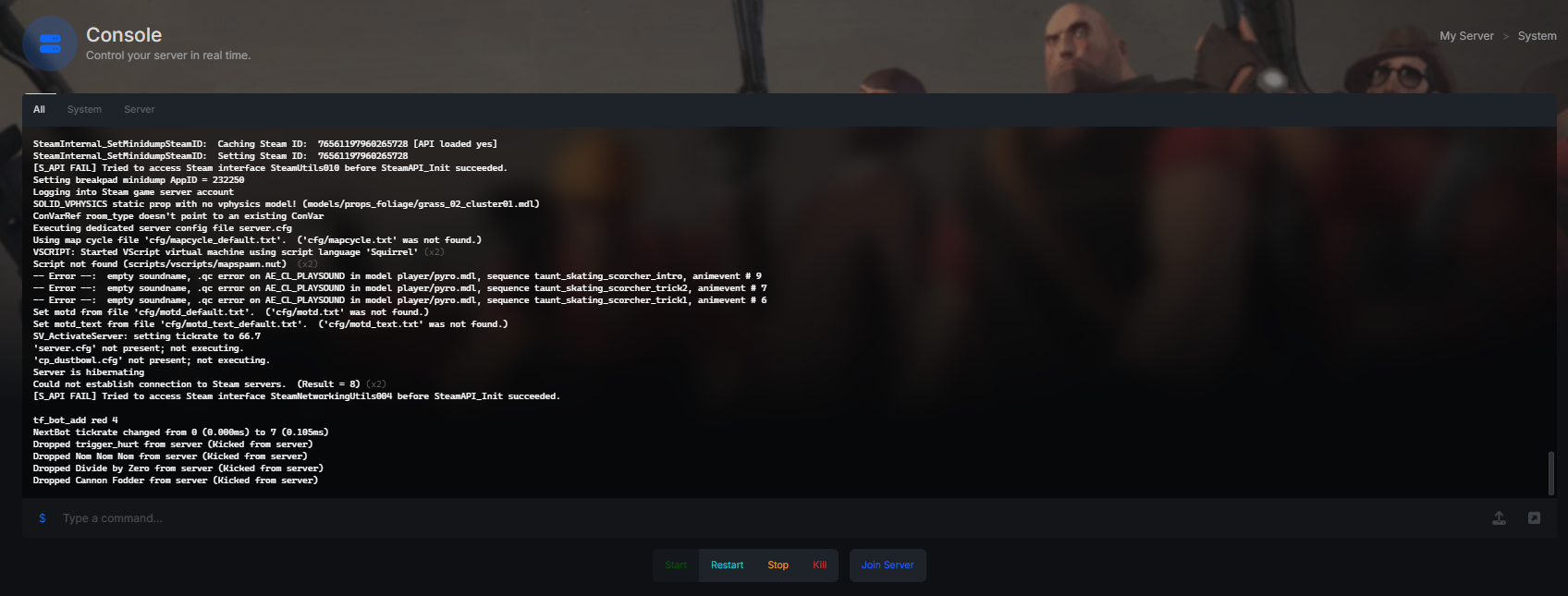
Adding bots to your TF2 server through the server console is the simplest way to do it!
To add bots to your TF2 server through the server console:
-
Navigate to your server console.
-
Enter the command tf_bot_add. This spawns one bot.
-
Add a specific number of bots using tf_bot_add 10
- The game will allow you to spawn bots until the maximum number of players is reached.
-
Add bots to a specific team using tf_bot_add red 4. This fills the red team with four bots.
-
Spawn bots with a specific class using tf_bot_add sniper
- Other available classes include: Scout, Soldier, Medic, Engineer, Spy.
By default, bots may respawn as a different class unless you use specific commands. To force all bots to respawn as a specific class, use the command tf_bot_force_class.
If you want bots to always respawn as the same class they were before dying, use tf_bot_keep_class_after_death.
Adding TF2 Bots Through Server CFG
You can also configure bots so they automatically spawn when the server starts by editing your server configuration file.
To add bots through server.cfg:
-
Locate your TF2 server installation folder.
-
Navigate to the cfg directory.
-
Open or create the file called server.cfg
-
Add the following lines:
tf_bot_add 10
tf_bot_difficulty 1-
Save the file.
-
Restart the server.
To control how many bots are present at any time, you can set a bot quota by adding the following lines to your server.cfg file:
tf_bot_quota desired_number
tf_bot_quota_mode fill
Replace desired_number with the number of bots you want on your server. The tf_bot_quota command determines how many bots will be present, and tf_bot_quota_mode fill will automatically fill empty slots with bots, removing them as human players join. This setup ensures bots are always present until replaced by human players, keeping your server full.
Unsupported Maps
Not every map in Team Fortress 2 is ready for bots right out of the box. Bots rely on a navigation mesh—a set of AI paths that tells them how to move around the map. If you try to add bots to unsupported maps, they won’t function properly unless a navigation mesh is present.
To add bots to these unsupported maps, you’ll need to use nav mesh editing mode. Start by opening the developer console and entering:
nav_edit 1This puts the game into nav mesh editing mode. Next, generate the initial nav mesh by typing:
nav_generateThe game will then create a navigation mesh, allowing bots to understand the layout and move around. After the nav mesh is generated, the map will reload automatically. You can now add bots using the usual tf_bot_add command.
Keep in mind that some maps may still not work well with bots. By following these steps, you can add bots to almost any map in Team Fortress 2 and enjoy offline play or practice sessions, even on maps that don’t officially support bots.
Final Notes
Learning how to add bots to TF2 server makes it easy to test maps, practice classes, and keep matches active when human players are not available.
Because Team Fortress 2 includes official bot support, you can quickly spawn bots, assign them to a team, choose a class, and adjust difficulty using a few simple console commands. With a properly generated navigation mesh, bots behave much closer to real players and make offline or private server play much more useful.
Note: Bots do not see Deathcam shots when killed, so players cannot earn Deathcam-related achievements with bots.