

Jumping into The Isle should feel intense, not confusing. If you’re trying to figure out how to connect to an Isle Evrima server, the goal is easy: get in fast and start playing. Still, new players often get stuck choosing the right Isle server, locating a server name, or deciding when to connect using a server IP.
Before you click play and hit connect, it’s important to know:
-
How to search for a The Isle server
-
How session filter settings shape results
-
When to use direct connect details
-
What to check if servers are missing
Once you understand the flow, joining the right server becomes second nature.
Joining An Isle Evrima Server Using The Server Name
To join a The Isle server:
-
Start by launching the game.
-
Once the game is running, click Play.
-
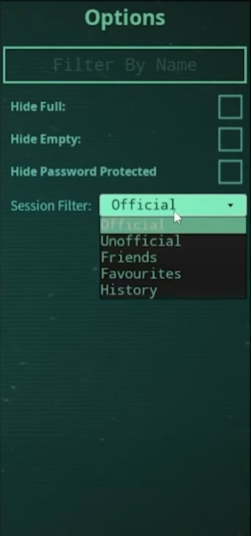
You’ll be brought to the server list, and on the right, you’ll see some options.
-
In the Session Filter option, choose Unofficial or Official, depending on the server you’re looking to join. Note that if this is a community or private server, you’ll want to set it to Unofficial.
-
Type or paste the server’s name into the Filter By Name box.
-
Refresh the page to apply the settings.
-
Select your desired server and click Connect.
-
Now you should be loading into the server!
Joining The Same Server As Your Friend Through The Steam List
To join the same server as your friend through the Steam list in The Isle:
-
Open Steam or the Steam Overlay and navigate to your friend’s list.
-
Under Friends In-Game, find the friend you want to join.
-
Right-Click on them or select the little dropdown arrow.
-
Alternatively, you can change the Session Filter to Friends, and it will display any online servers that your friends are in.
-
Click Join Game.
-
That’s it! Now you can have fun playing the game with your friends.
Direct Connecting To An Isle Server
To connect to a The Isle server with an IP address:
-
Open your Steam Library
-
Find The Isle, and right-click the game.
-
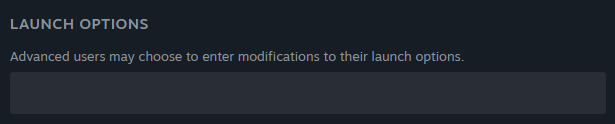
Select Properties and find Launch Options.
-
Type +connect followed by the server IP address and port into the box. For example, it might look something like this:
+connect 12.12.123.123:12345-
Close your properties; it should save automatically.
-
Launch the game, and you should be immediately connected to the server you want to join!
If you find that none of these methods are working, the server you want to join might not be online. Check out any of the community’s pages, like the forum, website, or Discord, if possible, to chat with people who can help you and see if they’re having any issues. You should also make sure you’re running the Evrima public branch of the game and that you’ve followed this guide correctly.