

Setting up a GMod TTT server lets you run one of the most iconic Garry’s Mod multiplayer experiences, built around rounds, roles, and social deduction gameplay.
Whether you are hosting for friends or launching a public TTT server, the setup process is straightforward once the gamemode and required content are installed correctly.
In this guide, you will learn how to set up a GMod TTT server, including how to install the TTT gamemode, configure core server settings, and add maps and addons using a workshop collection.
By the end of this tutorial, your GMod server will be fully configured to run Trouble in Terrorist Town smoothly, letting players jump in, start rounds, and enjoy classic TTT gameplay.
Adding TTT to Your Garry’s Mod Server
Adding the Trouble in Terrorist Town gamemode to your server is super simple because it comes included with your server when you install or purchase one! Despite this, we will still be showing you how to download and manually add the gamemode to your server anyway, in case you’ve deleted it or something has happened to it.
Recovering/Reinstalling TTT to Your Server
-
If you’ve lost your TTT gamemode on your server, you can easily find it in your game’s core files since Trouble in Terrorist Town is built into GMod itself.
-
Navigate to the GarrysMod/garrysmod/gamemodes directory in your personal game files and find the folder named terrortown.
-
Copy, but don’t delete, the folder and paste it into your server’s gamemodes folder located in the same directory from its root folder.
-
If you can’t find TTT in your personal files, something is wrong. You’ll have to either reinstall Garry’s Mod or validate your files to recover it.
-
That’s it! You have the gamemode installed on your server if it wasn’t already.
Changing Your Gamemode From Sandbox to TTT
-
If you’re a Physgun Client, login to your panel, navigate to the Server Options tab, and find the box labeled Gamemode.
-
Change the setting to terrortown.
-
Restart your server to apply the changes.
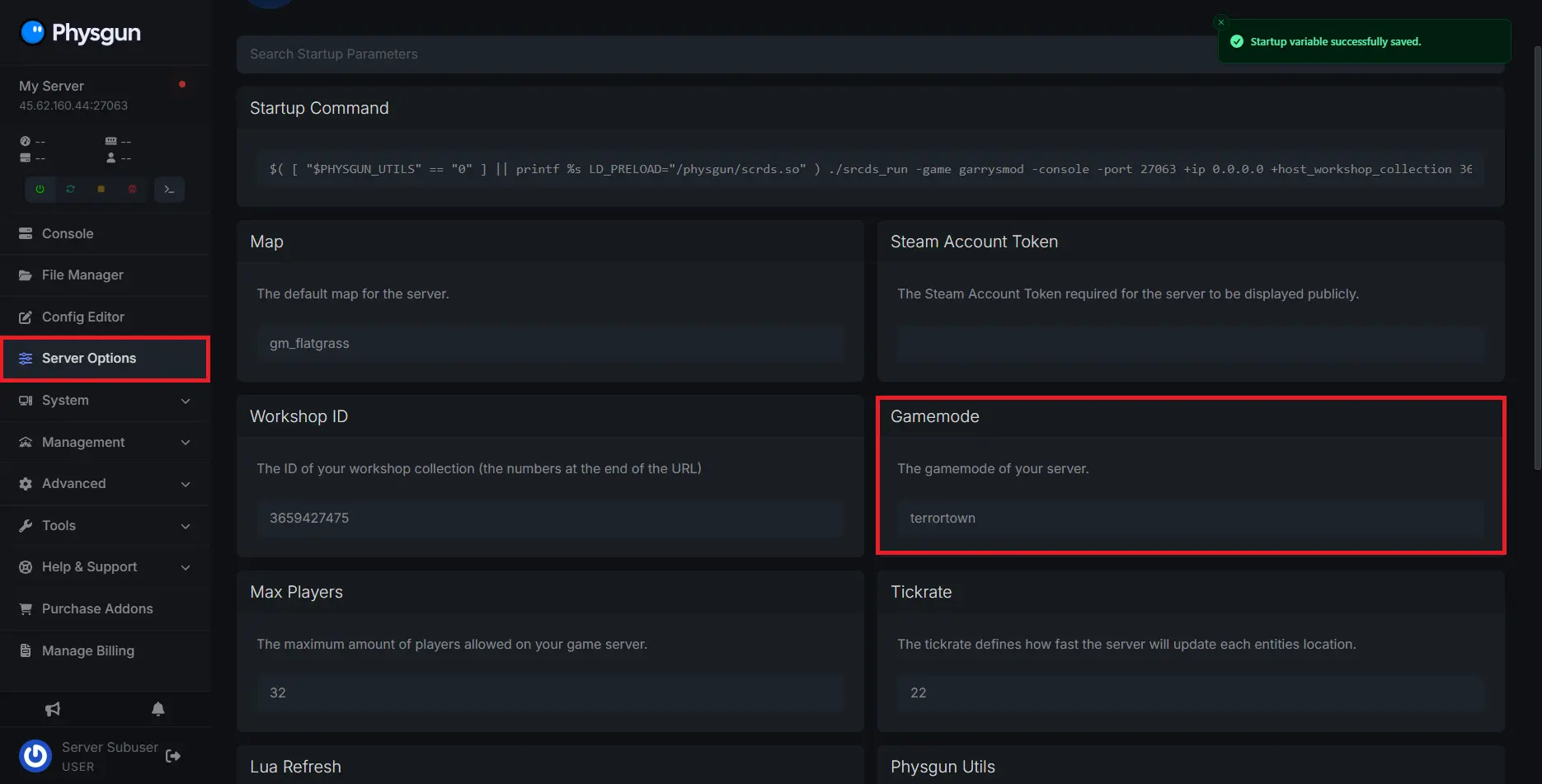
If you’re running a dedicated server and want to change your gamemode to TTT, open your batch file. Find the +gamemode parameter. In front of it, it should say “sandbox” by default. Change the value to terrortown. Save the file and load up your server.

When your server starts up, it will now be running Trouble in Terrorist Town! If any missing textures or model errors occurred when you load in, you may not have CS: Source mounted. Nowadays, these assets are included in Garry’s Mod, but anything can happen, and this is usually the source of the problem if it arises.
Adding Addons to your TTT server
It’s one thing to run a vanilla TTT server, but you probably want yours to be unique! To be unique, you’ll need to add some addons to spice up your game a little bit. This next section will go over the basics of adding addons to your server!
How to Create and Mount a Workshop Collection
-
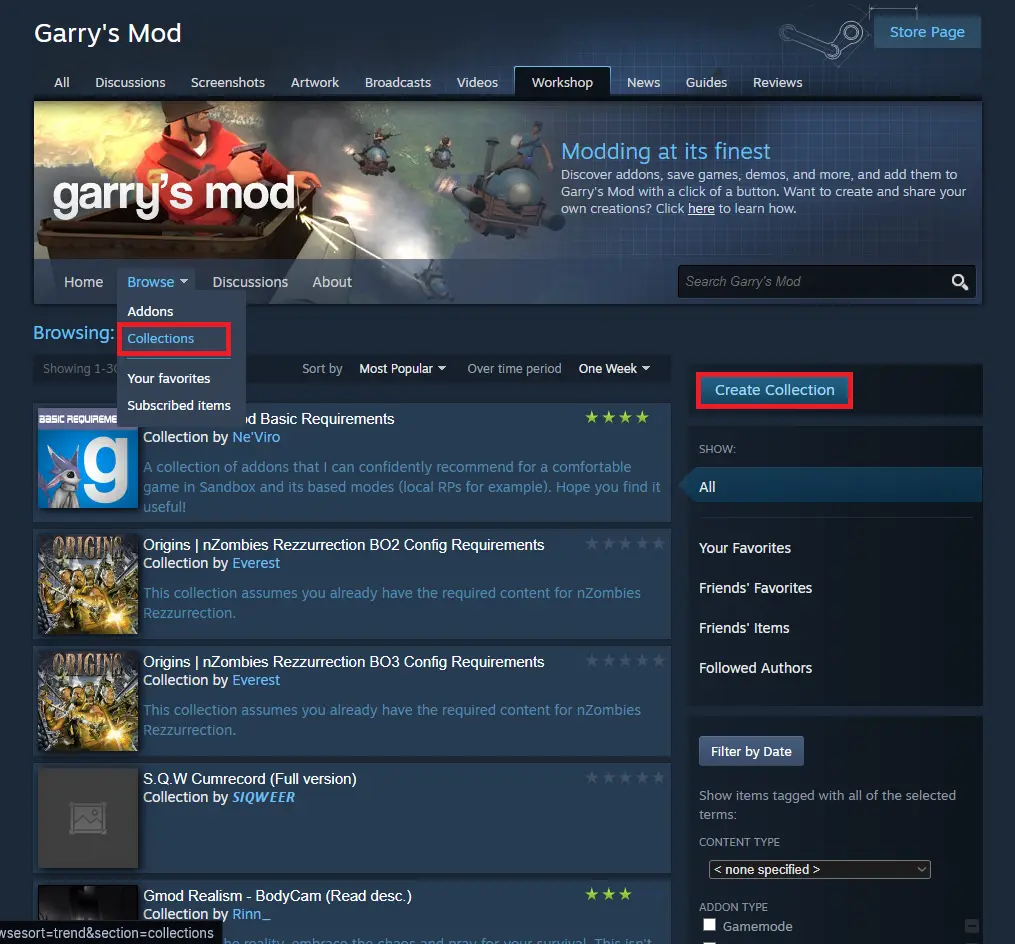
Visit the GMod workshop.
-
Hover over the Browse tab and select “Collections”.
-
On the far right, you’ll see a button that says Create Collection. Click it.
-
Fill out the options for your collection’s title, description, and branding image.
-
Ensure the Items that work together option is selected to allow your users to subscribe to all of the addons at once.
-
Select your collection’s appropriate tags and click Save and Continue.
-
You’ll be prompted to add some addons to your collection. You may not have all of the addons you want to add just yet, so add a placeholder and return to the collection later when you have them if that’s the case.
-
Next, you’ll be prompted to give the collection a background image and a preview video. Both of these are optional, but they make your collection look nice.
-
Publish your collection and add it to your favorites so it’s easy to return to later.
-
Once you have your collection created, open up your Physgun server panel and select the Server Options tab.
-
Find the Workshop ID option and paste your collection ID, which can be found in the URL, in the box.

-
If you are running a dedicated server, you can find the +host_workshop_collection option in your batch file.
-
Change the value of this setting to your collection’s ID.
-
Now you have a fully functional workshop collection mounted to your server that you can add all sorts of addons to!
How to Install Addons from the GMod Store
-
Visit gmodstore.com.
-
Browse the catalog of custom scripts.
-
Purchase and download one that catches your eye.
-
You will have received a .zip file. Extract it.
-
Open your file manager or server file directory.
-
Navigate to your server’s addons folder, located in the garrysmod/addons directory.
-
Drag and drop the extracted file into the addons folder.
-
Make sure to add any addon content into your workshop collection as well. This should be linked in the Gmodstore addon description
-
Restart your server and voila! You’ve manually installed an addon to your TTT server.
For a more in-depth explanation on how to add addons to your GMod server, we have another article in our Help Center that goes over it, among other topics involving addon management.
Changing Your TTT GMod Server Settings
The final step toward creating your own TTT server is configuring its settings. All of the server-side options can be changed by simply typing them into your server.cfg file, located in the garrysmod/cfg directory. You can find a list of convars on the TTT wiki. For example, these settings allow you to change game rules such as traitor and detective limits, the karma system, points, credits, voice chat, or timers. You can also change client settings by pressing F1 in-game. Be sure to read the details of certain convars because misusing them can lead to lagging or crashes.
Additionally, you can modify weapons and entities in the gamemodes/terrortown/entities directory. If you want weapons to have different stats or add your own custom weapons, you’ll do it in here. It’s important to note that this depends on you having some Lua knowledge to edit or add weapons yourself.
Finally, you can add maps to the rotation by putting the map name in the mapcycle.txt file located in the garrysmod/cfg directory. However, we suggest using a rotation addon like MapVote instead due to the other method being outdated.
With that, you have all of the knowledge necessary to create your very own Trouble in Terrorist Town server. Now you and your players can join up and play TTT together!