

If your Garry’s Mod server feels chaotic, unlimited speed is often the culprit. Players moving too fast can break roleplay flow, exploit mechanics, or stress server performance. Lowering max speed gives you tighter control over player behavior without hurting fun. This guide walks through the cleanest ways to set a speed limit using gamemode settings, server-side addons, or simple config changes.
You’ll learn how to:
-
Adjust player speed at the gamemode level.
-
Use mods that enforce a global speed limit.
-
Fine-tune movement without breaking play styles
-
Apply changes safely so they persist after restarts
Adjusting The Speed On A Garry’s Mod Server
Depending on the server you’re running, the Garry’s Mod community offers a few solutions for changing your players’ speed. Certain game modes, such as DarkRP, offer built-in configuration options, while in other cases, you’ll have to use some workshop resources to achieve your desired outcome. This guide will also help you set up a server-side script that will reduce the speed of all players on your server when they join using a simple PlayerSpawn hook.
Changing the Default Speed Limits in the DarkRP Settings
In DarkRP, you can easily modify the default speed values in the gamemode’s configuration files.
To change movement speed values in DarkRP:
-
Open up your file manager or Windows File Explorer.
-
Navigate to your server’s root folder and then to the garrysmod/addons/darkrpmodification/lua/darkrp_config directory.
-
Open the file named settings.lua.
-
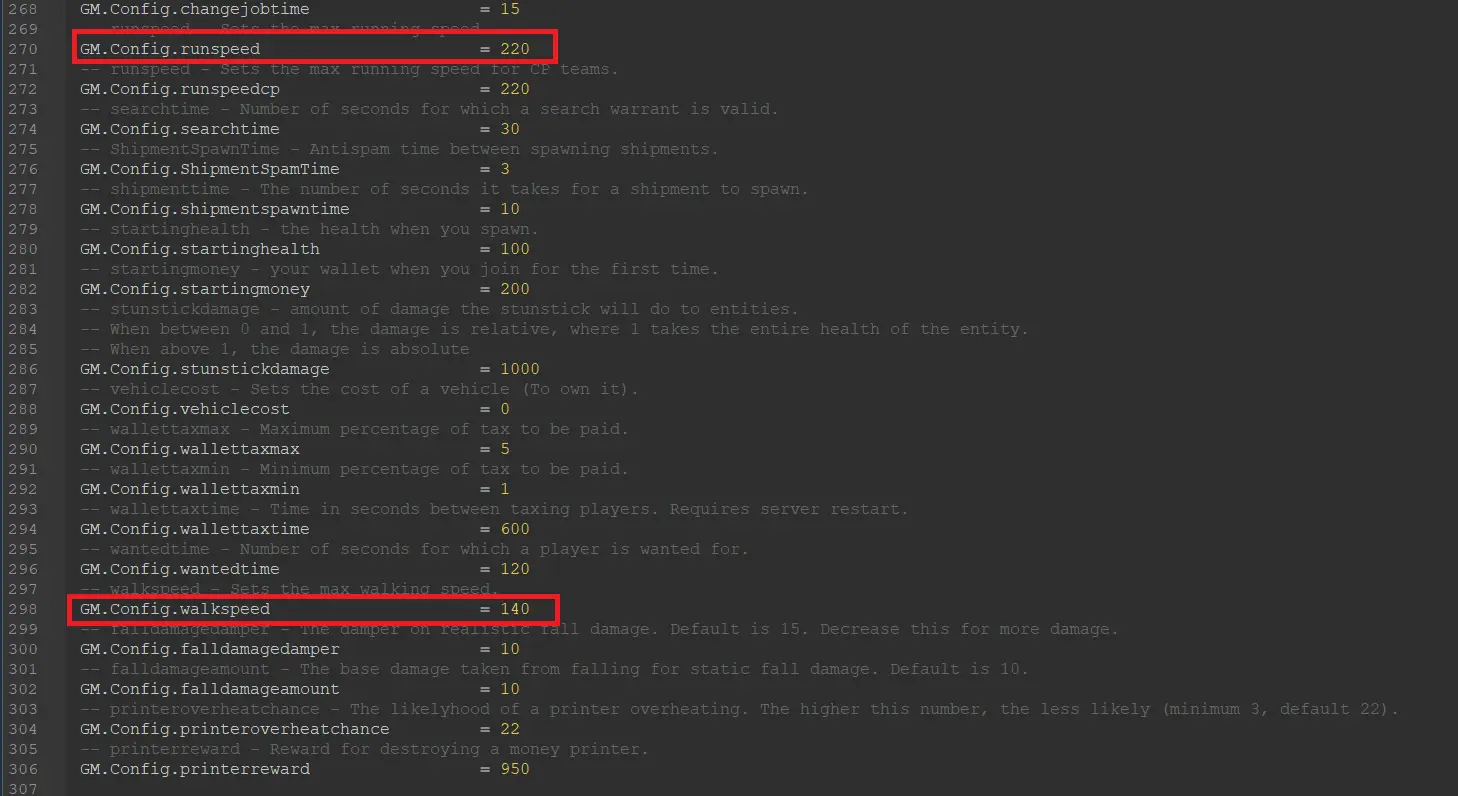
Scroll to lines 270 and 298. Here you will find the default player speed configuration values.
-
Change them to your desired values.
-
Save the file and restart your server.
-
Remember to load in and test out your values to make sure the speed is exactly the way you want it.
-
That’s it! If you’re running a DarkRP-based server, the speed values are all configured.
Temporarily Changing Speed Values with Admin Commands
If you ever need to temporarily set a player’s movement speed for events or even to test out different values, you can do so using ULX admin commands.
To change movement speed values using ULX:
-
Visit the Garry’s Mod workshop.
-
Type “ULX” in the search bar.
-
Subscribe to and add ULX, ULib, and ULX Custom Commands to your workshop collection.
-
Restart your server to install the addons.
-
Join your server and open up your admin console (The one on your panel, not the in-game one).
-
Type ulx adduser “(Your Name)” superadmin into the console and hit enter.
-
This will allow you to use ulx commands to their fullest.
-
Type !menu into your in-game chat to open up the admin menu.
-
Scroll down to the Fun tab and select the Speed option.
-
From here, you can view a list of players and adjust their speed individually.
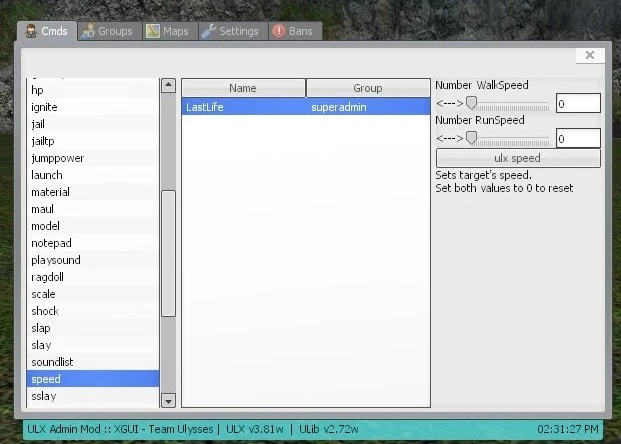
Alternatively, you can type the !speed command. Below is an example of how this should be formatted:
!speed (String: Target Name) (Number: Walk Speed) (Number: Run Speed)
EX: !speed Garry 240 360- There you have it, now you know how to change a player’s speed with ULX commands!
Changing the Default Speed Limits with Lua
If you happen to be running a game mode that doesn’t offer a speed setting, and you still want to change the default speed server-wide, you might have to get your hands dirty with a little Lua code. If you’re unfamiliar with the language, this may seem intimidating, but worry not! This section of the guide will explain how the SetWalkSpeed and SetRunSpeed values work, in the simplest terms. If everything goes as planned, you should have a fully functioning speed correction script!
To make a server-side speed correction script:
-
Open up your file browser and navigate to your server’s addons folder located in the garrysmod/addons directory.
-
Create a new folder and title it whatever you’d like.
-
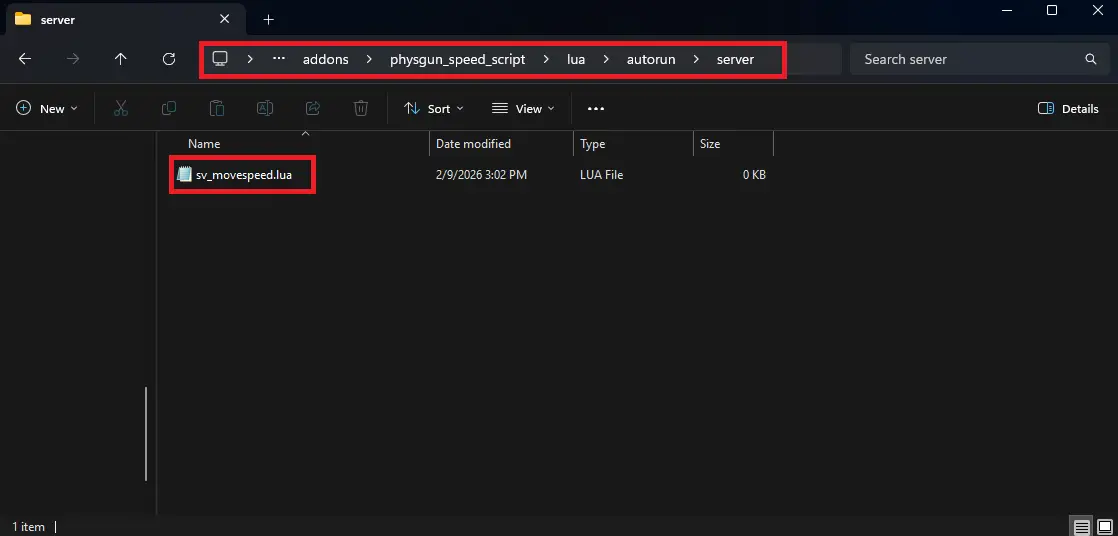
Inside this folder, create the directory: lua/autorun/server. Files located in this directory will run exclusively server-side and initialize when the server boots up.
-
Now, create a .lua file and name it whatever you’d like.
-
Open the file and add the code listed below. Next to each line, there is a comment explaining what it does.
local globalWalkSpeed = 240 -- Defines a variable that will be referred to to set the walk speed.
local globalRunSpeed = 400 -- Defines a variable that will be referred to to set the run speed.

hook.Add( "PlayerSpawn", "CorrectMoveSpeed", function( ply ) -- Adds the PlayerSpawn hook under the name CorrectMoveSpeed. This line also defines the ply variable that will refer to the player that is spawning.
	if not IsValid( ply ) then return end -- Checks if the player spawning is valid. This is mostly a contingency to prevent errors. If the player isn't valid, the hook will end here and not continue.

	ply:SetWalkSpeed( globalWalkSpeed ) -- Sets the player's Walk Speed to the variable defined above.
	ply:SetRunSpeed( globalRunSpeed ) -- Sets the player's Run Speed to the variable defined above.

end ) -- Closes the function.- The code above is the simplest way you can forcefully correct the speed for all players on our server. If you find that the code isn’t working, you may have another script trying to correct the player’s speed already. There is a simple workaround for this, and that’s to add a timer to ensure this code is run after any other speed-altering scripts. Replace the contents of the hook with the code below.
timer.Simple( 0.1, function() -- Starts a quick 1/10th of a second timer.
	if not IsValid( ply ) then return end

	ply:SetWalkSpeed( globalWalkSpeed )
	ply:SetRunSpeed( globalRunSpeed )
end ) -- Closes the timer.
Once this code is all finished, restart your server so it can be initialized.
That’s it! Now you’re familiar with modifying movement speed in Lua!