How To Check Combat Log Rust
Learn how to check your combat log in Rust.
How To Check Combat Log Rust
In the world of Rust, every fight matters. Whether you’re trying to assess your damage, confirm who landed the final blow, or just want to track your health over time, the combat log is an essential tool. It captures detailed information about every encounter, giving you a comprehensive view of your in-game battles. Understanding how to read and utilize the combat log can significantly enhance your gameplay strategy and decision-making.
This guide will walk you through the process of accessing, interpreting, and using the combat log effectively. We’ll break down what the log contains, how to open it, and what to look for during a fight. Whether you’re a new player or an experienced Rust user, these steps will help you make the most of this powerful resource.
What the Combat Log Actually Is
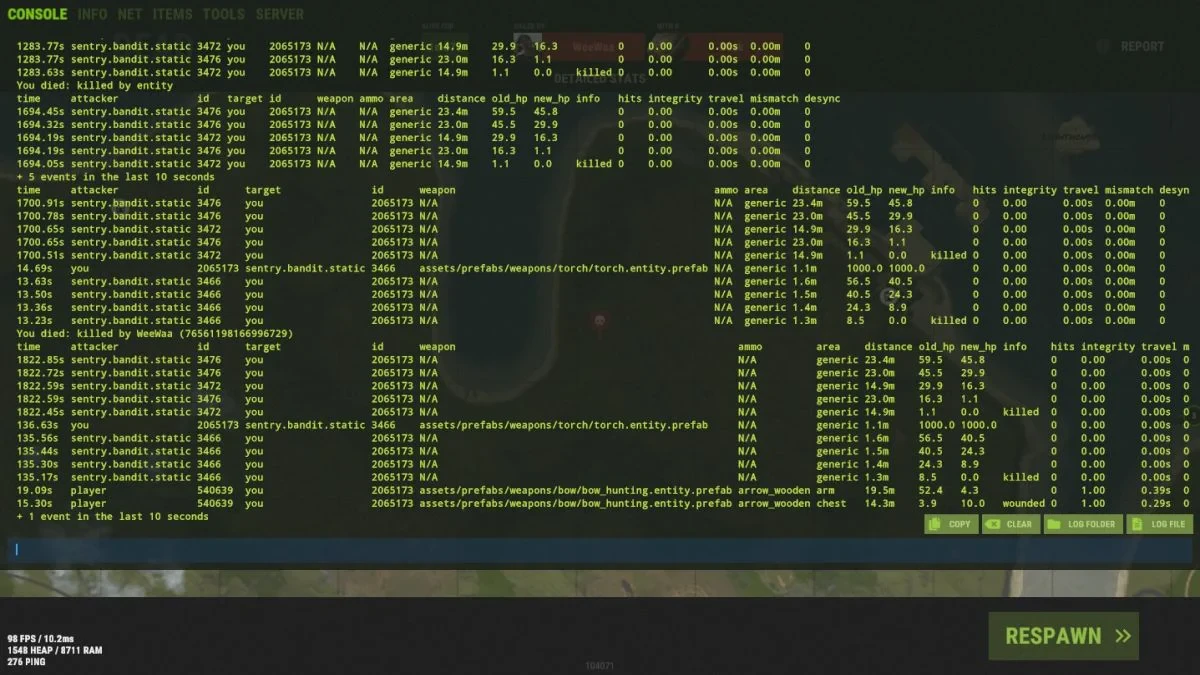
The combat log is a record of all combat events involving your character in Rust. Each entry provides a snapshot of what happened during a fight. Common details include:
-
The attacker’s and target’s information
-
The weapons used and ammunition types
-
The exact locations of hits
-
The amount of damage dealt and received
-
The distance between players
-
Health before and after each impact
-
Whether the fight resulted in a kill or wound
By reviewing these entries, you can quickly determine key facts such as the extent of damage, the effectiveness of your attacks, and even the identities of those involved. This information is invaluable for both casual players and competitive fighters.
Getting Started with the Command to Open the Console
To access the combat log, press F1 to open the in game console, type combatlog, and hit Enter.
The displayed information can have a 10-second delay. The combatlog command shows your recent combat history in a clear and organized format. You can also set a key bind or shortcut on your keyboard to check the combat log instantly instead of typing it every time. The rust combat log records the last 100 combat events by default for each player, and admins can adjust the log size with combatlogsize, so results can vary across servers.
Remember, the console is your primary tool for real-time combat analysis. Simply press Esc to close it once you’re done reviewing the logs.
What to Expect from a Combat Log Entry
Each line in the combat log contains a structured format, and the command displays key data such as the time of event, attacker and target names, weapon used, and type of ammunition; Rust identifies players through steam id values, which parsers can use to improve readability. Here’s a breakdown of what you might see:
| Field | What It Means |
|---|---|
| Time | The timestamp of when the event occurred |
| Attacker | The player or entity responsible for the damage |
| Target | The player or object that took the hit |
| Weapon | The weapon used, such as a gun or axe |
| Ammo | The type of ammunition, if applicable |
| Area | The hit locations shown for the strike (e.g., head, chest, legs) |
| Distance | The range of the engagement between attacker and target |
| Old HP | The health value before the hit |
| New HP | The health value after the hit |
| Info | Additional notes, such as whether the target was wounded or killed |
These details show how much damage the entry represents, how effective your shots were, and how the fight played out, since the log tracks fights in a play-by-play way. They also help you evaluate aim and positioning. The Rust Combat Log Parser transforms the raw output into a clean, organized, visual table that helps analyze combat performance, including on modded servers.
Making the Most of Your Combat Log on Modded Servers
To get the most out of your combat log, you can apply several strategies:
-
Review recent fights after intense battles to identify patterns, especially when you got caught by a sniper or in another sudden engagement.
-
Compare HP values before and after each hit to gauge damage accuracy and see whether an opponent was low before you pushed for loot.
-
Use a bind to quickly open the console during active engagements.
-
Export logs as text files or screenshots for offline analysis.
-
Check server settings to ensure your combat log behaves as expected.
By mastering the combat log, you’ll gain deeper insights into your gameplay and make smarter decisions during future fights.
Tips for Effective Combat Log Use
-
Always keep a record of important entries, especially after significant battles, and use a parser or external tool to generate a cleaner shareable view of key moments.
-
Use the command history to compare different weapons or strategies.
-
Be cautious of server-specific settings that might alter log behavior.
-
Don’t overlook the value of parsing logs manually if you need more context, since some tools can create a shareable link for review.
Why the Combat Log Matters
The combat log is more than just a record of damage; it’s a tool for improving your skills. Whether you’re aiming to increase your health, reduce enemy damage, or simply track your progress, the combat log provides actionable data. Understanding how to navigate and interpret this information can turn your Rust experience from reactive to strategic.
By following the steps outlined in this guide, you’ll be able to access, analyze, and utilize your combat log effectively. With practice, you’ll find yourself making faster, more informed decisions in every encounter.
This article aims to give you a clear understanding of the combat log in Rust. If you’ve ever wondered how to check a combat log in-game or what it reveals about your gameplay, this guide is for you. Remember, the key is to stay organized and keep your logs up to date. With these skills, you’ll be well-equipped to handle any situation on the battlefield.
For further assistance, refer to the official Rust documentation or community forums where players share tips and tricks. Your journey in Rust starts with understanding one of its most powerful features, the combat log.